
 https://www.omahamediagroup.com/images/uploads/monster_gallery/Omaha-Media-Group-Black.jpg
admin
https://www.omahamediagroup.com/images/uploads/monster_gallery/Omaha-Media-Group-Black.jpg
admin
How to optimize your website for SEO and revenue

TL;DR:
- Most small and medium business websites are losing potential revenue due to overlooked technical details, weak content structure, and untested pages. Establishing a solid technical foundation with HTTPS, mobile responsiveness, crawlability, and proper status codes is essential for effective SEO. Continuous testing, measuring, and aligning optimization efforts with business goals turn websites into reliable revenue engines.
Your website is either working for you or silently costing you money. Most small and medium-sized business websites fall into the second category, not because of bad design, but because of overlooked technical details, weak content structure, and untested pages that never get optimized. These gaps quietly drain search visibility and sales potential every single day. Strategic website optimization changes that equation. When done correctly, it aligns how search engines crawl and rank your site with how real users make buying decisions, and the revenue impact is measurable, repeatable, and compounding.
Table of Contents
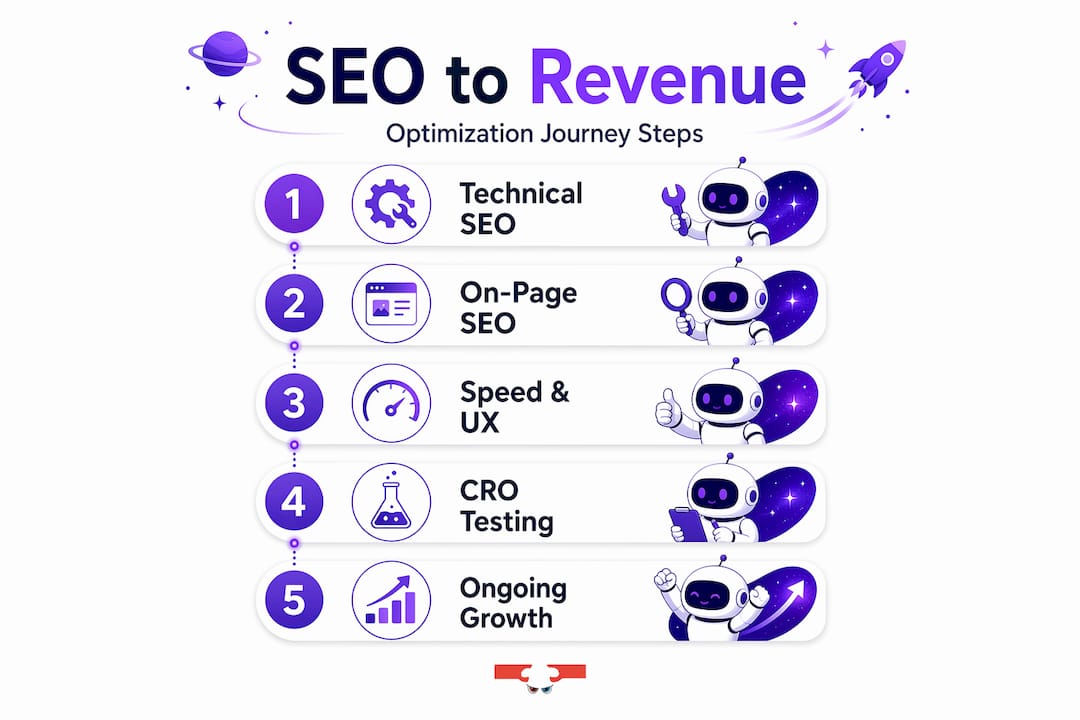
- Technical SEO fundamentals: Setting the foundation
- On-page SEO: Structuring content for results
- Speed and usability: Maximizing website performance
- Testing and measuring: Conversion rate optimization (CRO)
- Our perspective: What most guides miss about website optimization
- Get hands-on help optimizing your website
- Frequently asked questions
Key Takeaways
| Point | Details |
|---|---|
| Technical SEO essentials | Start with HTTPS, mobile compatibility, and crawlability for reliable search performance. |
| On-page content structure | Well-crafted titles, meta descriptions, and headers boost visibility and engagement. |
| Speed optimization | Compress images, use lazy loading, and minimize resources for fast, user-friendly pages. |
| Testing yields revenue | Regular A/B testing and CRO deliver measurable gains for conversion and revenue. |
| Avoid risky automation | Use AI and automation wisely; always structure content to meet user and search expectations. |
Technical SEO fundamentals: Setting the foundation
Before any other optimization effort can succeed, your website needs a solid technical foundation. Think of it like a building: the most beautiful interior means nothing if the structure is compromised. Search engines need to crawl, index, and trust your site before they will rank it for anything meaningful.
The starting point is HTTPS security. If your website still runs on HTTP, you are sending both users and search engines a signal that your site is not secure. Google has used HTTPS as a ranking signal since 2014, and modern browsers actively warn visitors when a site lacks an SSL certificate. That warning alone can increase bounce rates dramatically. According to Google’s technical guidelines, your site needs HTTPS, mobile-friendliness, proper crawlability via robots.txt and sitemaps, HTTP 200 status codes, and no blocking of important resources to meet basic technical SEO requirements.
Mobile-first design is equally non-negotiable. Google indexes the mobile version of your site first, not the desktop version. If your layout breaks on a smartphone, your rankings will suffer, regardless of how strong your content is. Responsive design, which automatically adapts your layout to any screen size, is the standard solution.
Crawlability determines whether search engines can even find your pages. Your robots.txt file tells search engine bots which pages to crawl and which to skip. Your XML sitemap provides a roadmap of all the pages you want indexed. Without both in place, you risk having important pages ignored entirely. You can review recent SEO changes that affect how crawling priorities have shifted in 2026.
HTTP status codes are another critical factor. A page returning a 404 error (not found) or a 500 server error signals a broken experience to both users and search engines. Redirecting outdated URLs with 301 redirects, resolving broken links, and monitoring server errors should be a routine maintenance task.
| Technical SEO element | Why it matters | Quick check method |
|---|---|---|
| HTTPS | Trust and ranking signal | Check browser address bar |
| Mobile responsiveness | Mobile-first indexing | Google Mobile-Friendly Test |
| XML sitemap | Helps search engines index pages | Submit via Google Search Console |
| robots.txt | Controls crawl access | Visit yourdomain.com/robots.txt |
| HTTP 200 status | Confirms page is accessible | Use Screaming Frog or similar |
| No render-blocking scripts | Ensures pages load fully | Google PageSpeed Insights |
Foundation checklist:
- SSL certificate installed and active
- All pages return HTTP 200 status
- Mobile responsiveness verified across devices
- XML sitemap submitted to Google Search Console
- robots.txt reviewed and updated
- No orphaned pages (pages with no internal links pointing to them)
“If search engines cannot access and trust your website, every other optimization effort you make is built on sand. Fix the technical foundation first, and everything else compounds on top of it.”
Pro Tip: Run a free crawl of your website using Google Search Console’s URL Inspection tool at least once a month. It surfaces crawl errors and indexing issues before they become ranking problems. For a deeper walkthrough of SEO basics specific to your industry, there are resources built for businesses across many sectors, including SEO tips for healthcare providers and other specialized fields where trust signals carry extra weight.
With the basics addressed, it’s time to refine your site’s visible elements for maximum impact.
On-page SEO: Structuring content for results
Technical SEO gets your pages indexed. On-page SEO determines whether they rank well and whether users stay long enough to convert. This is where most business websites leave significant opportunity on the table.
Title tags and meta descriptions are your first impression in search results. A title tag should include your primary keyword, stay under 60 characters, and clearly communicate the page’s value. A meta description (around 155 characters) should reinforce the title and include a reason to click. Keyword-optimized titles and meta descriptions, paired with a logical H1-H3 heading structure, are foundational to strong on-page performance.
Here’s how a typical page structure optimization works step by step:
- Identify your primary keyword for each page. One page, one primary focus. Trying to rank for too many topics on a single page dilutes relevance.
- Write your H1 heading using the primary keyword naturally. This is the first thing search engines look at to understand page intent.
- Use H2 headings to organize major subtopics. These help users skim and help crawlers map page structure.
- Use H3 headings for supporting details within each H2 section.
- Add internal links to related pages on your site. This distributes link equity (the SEO value passed between pages) and helps both users and crawlers navigate your content.
- Integrate E-E-A-T signals. E-E-A-T stands for Experience, Expertise, Authoritativeness, and Trustworthiness. Adding author credentials, citing sources, and including case studies or real data are all ways to demonstrate these qualities.
| Element | Generic (weak) approach | Optimized approach |
|---|---|---|
| Title tag | “Services Page” | “Custom Plumbing Services in Denver, CO” |
| Meta description | “We offer great services.” | “Licensed Denver plumbers available 24/7. Free estimates. Call today.” |
| H1 heading | “Welcome to our site” | “Trusted Plumbing Services for Denver Homeowners” |
| Internal links | Random, unrelated | Contextual, linking to relevant service or blog pages |
| E-E-A-T signals | None | Author bio, certifications, real customer reviews |
Pro Tip: When optimizing graphics on your pages, always add descriptive alt text. Search engines cannot see images, but they read alt text, and so do screen readers. This small step improves both SEO and accessibility at the same time.
Staying aligned with current marketing trends matters here too. Search behavior shifts constantly, and your on-page content needs to reflect how your audience is actually searching, not how you think they are. Pairing your on-page strategy with a broader set of digital marketing strategies ensures your content reaches users across multiple channels, not just search. For more on how the Google Page Experience update affects on-page decisions, understanding those signals will sharpen your prioritization.
Content structure handles engagement, but performance hinges on speed and usability.
Speed and usability: Maximizing website performance
Page speed is not a nice-to-have. It is a direct ranking factor and an even more direct revenue factor. A one-second delay in page load time can reduce conversions by up to 7%. For a business generating $100,000 per month online, that is $7,000 lost every month from a single technical lag.
The most effective speed optimization techniques in 2026 focus on five core areas: image optimization, lazy loading, code minification, content delivery networks (CDNs), and reducing time to first byte (TTFB).
Image optimization is the single fastest win for most websites. Uncompressed images are the top cause of slow load times. Converting images to next-generation formats like WebP, reducing file sizes before upload, and using tools that compress without visible quality loss can cut page weight by 50% or more.

Lazy loading means images and videos only load when a user scrolls down to see them. Instead of loading everything at once when a visitor arrives, the browser prioritizes what is visible first. This dramatically improves perceived load speed, especially on mobile.
Minifying CSS and JavaScript removes unnecessary characters (spaces, comments, line breaks) from code files without changing their function. Smaller files load faster. Most content management systems have plugins that handle this automatically.
Content delivery networks (CDNs) store cached copies of your site on servers around the world. When a user in Tokyo visits your website hosted in Chicago, a CDN delivers the content from the nearest server instead, reducing load time significantly.
Time to first byte (TTFB) measures how long it takes for a browser to receive the first piece of data from your server. A high TTFB (above 800ms) usually signals server-side issues, including slow hosting, unoptimized databases, or inefficient server configurations.
Speed optimization checklist:
- Compress and convert all images to WebP format
- Enable lazy loading for images and embedded videos
- Minify CSS, JavaScript, and HTML files
- Implement a CDN (Cloudflare, Amazon CloudFront, or similar)
- Upgrade hosting to a plan with faster server response times
- Enable browser caching so repeat visitors load your site faster
- Eliminate render-blocking resources that delay page display
Pro Tip: Pair your speed improvements with stronger image optimization practices and complement them with consistent outreach through email marketing strategies that drive repeat visitors back to your now faster, better-converting pages.
Once your pages load swiftly and smoothly, ongoing improvement comes from testing and analytics.
Testing and measuring: Conversion rate optimization (CRO)
More traffic is not the goal. More revenue from your existing traffic is often the smarter and faster path. That is where conversion rate optimization (CRO) comes in. CRO is the practice of systematically improving the percentage of visitors who take a desired action, whether that is filling out a form, calling your business, or making a purchase.
A/B testing is the engine of CRO. You create two versions of a page (A and B), show each to a segment of your traffic, and measure which version performs better. Teams that run 15-30 A/B tests per month achieve 20-40% annual conversion gains, with an industry-wide win rate of 36% and a median conversion lift of 1.88% per test. Over time, those incremental gains add up to transformational revenue improvements.
Four steps to start testing effectively:
- Prioritize high-traffic pages first. Testing a page that gets 50 visitors a month will take forever to reach statistical significance. Start with your top landing pages.
- Test one variable at a time. Change a headline, a CTA button color, or a form length, but not all three at once. Isolating variables gives you clean data.
- Let tests run long enough. A common mistake is stopping a test after two days. Run tests for at least two business cycles (usually two weeks minimum) to account for behavior variations.
- Act on results and document everything. Apply winning variations, document what you learned, and use those insights to inform future tests.
| CRO metric | Definition | Why it matters |
|---|---|---|
| Conversion rate | % of visitors who take a desired action | Core measure of page effectiveness |
| Revenue per visitor (RPV) | Total revenue divided by total visitors | Shows true monetary value of each visit |
| Bounce rate | % of visitors who leave without interacting | Signals content-user mismatch |
| Time on page | Average time spent on a given page | Indicates content engagement |
| A/B test win rate | % of tests that produce a positive result | Benchmarks testing program quality |
The synergy between CRO and SEO is often underestimated. When you improve a page’s relevance and engagement (lower bounce rate, higher time on page), search engines interpret those signals as quality indicators and may reward the page with better rankings. SEO and CRO are not separate strategies; they feed each other.
One significant risk to flag: AI-enhanced search results increasingly surface structured content in AI Overviews. This means using structured data markup (schema.org) on your pages gives you a real competitive advantage, while mass-produced AI content that triggers spam policies can get pages de-indexed entirely. Quality, relevance, and structure matter more than ever.
Having explored rigorous improvement cycles, let’s consider deeper lessons most guides overlook.
Our perspective: What most guides miss about website optimization
Most website optimization guides treat traffic as the ultimate goal. More visitors equals more success. We disagree with that framing fundamentally, and 15-plus years of working with businesses across dozens of industries has reinforced that view consistently.
Traffic without conversion intent is noise. We have seen companies invest heavily in SEO services to triple their organic traffic while their revenue stayed flat, because no one had asked: “Are we attracting the right visitors, and is the page ready to convert them when they arrive?” Those are two separate questions, and both need a clear answer.
The other trap we see businesses fall into is automation dependency. AI tools for content creation, CRO testing, and technical audits are genuinely powerful. But they require skilled oversight. Scaled AI content that lacks originality, real experience signals, or factual accuracy does not just underperform. It can actively damage your site’s standing with search engines. Every optimization step you take should serve a real user need first, and meet a search engine requirement second. When those priorities are reversed, you end up with technically “optimized” pages that no human actually wants to read.
The businesses we see win consistently are the ones that treat their website as a revenue system, not a digital brochure. They test relentlessly, measure outcomes instead of activities, and connect every optimization effort back to a business goal. That discipline is what separates compounding growth from one-time traffic spikes.
Get hands-on help optimizing your website
Understanding these strategies is one thing. Executing them consistently while running a business is another challenge entirely.

At Monstrous Media Group, we build systems that turn website optimization from a one-time project into a continuous revenue engine. Whether you need a full technical audit, an on-page content overhaul, or a structured CRO program, our team delivers measurable outcomes, not activity reports. Explore our SEO services to see how we approach search visibility, or take a look at our full suite of digital marketing solutions to align every channel with your revenue goals. If your site itself needs a rebuild from the foundation up, our web design and development team creates fast, mobile-ready, SEO-friendly websites built to convert from day one.
Frequently asked questions
What are the most critical technical SEO checks?
Securing your site with HTTPS, ensuring mobile responsiveness, and making your pages crawlable via robots.txt and sitemaps are the most vital technical SEO checks every site needs to pass before other optimizations can take effect.
How can I improve my site’s speed quickly?
Optimizing images, enabling lazy loading, and minimizing your CSS and JS files are straightforward steps that can dramatically boost site speed, as these 2026 speed techniques confirm with measurable benchmarks.
Do A/B tests really help conversion rates?
Yes. A/B testing key pages yields a 36% win rate with a median conversion lift of 1.88%, and teams running 15-30 tests per month see 20-40% annual gains in conversions.
How can I avoid SEO penalties related to AI content?
Avoid mass-produced AI content that triggers spam policies, and use structured data for AI Overviews and rich results to help search engines understand and surface your pages appropriately.
What should I focus on after technical and on-page SEO?
Once your technical and content optimizations are solid, shift focus to ongoing A/B testing, measuring revenue per visitor rather than raw traffic, and continually refining user experience to improve both conversions and long-term search performance.
Recommended
Hire the team to help you with your website, app, or other marketing needs.
We have a team of digital marketers who can help plan and bring to life all your digital marketing strategies. They can help with social media marketing, email marketing, and digital advertising!
CONTACT US
Comments