
Server-side rendering delivers fully formed, indexable HTML on the first request, which makes it the safer default for any public page that needs to rank. Client-side rendering forces Google to queue your pages for a second rendering pass before it can see your content, and that delay creates real indexing risk. The trade-offs worth managing are indexing reliability against Time to First Byte, and server cost against Largest Contentful Paint. The practical move: adopt hybrid, per-page rendering, then verify it with crawler and no-JavaScript checks before you trust it in production.
TL;DR:
- Server-side rendering ensures complete, indexable HTML is delivered on the first request, reducing indexing delays and hiding content from JavaScript-dependent rendering issues.
- Embedding meta tags and JSON-LD structured data directly in server responses boosts rich snippets and social media previews, avoiding inconsistencies caused by client-side injection.
- Proper SSR implementation involves fetching core content server-side, minimizing JavaScript payloads, and caching effectively at the CDN or edge layers to maintain performance.
- Continuous testing with tools like Screaming Frog, Lighthouse, and real user monitoring is essential to detect and prevent regressions that could diminish search visibility.
- Using hybrid, per-page rendering strategies tailored to content stability and update frequency optimizes both SEO and performance, with ongoing operational monitoring required for sustained success.
Monstrousmediagroupmonstrousmediagroup.comBuild A Search Ready Web SystemMonstrous Media Group designs SEO friendly web applications and marketing systems built to capture and close more revenue.Explore Monstrous Media Group
Table of Contents
- Server Side Rendering SEO: The Vocabulary You Need First
- How Server Side Rendering SEO Affects Crawling and Indexing
- Core Web Vitals, TTFB, and Hydration: The Real Performance Trade-Off
- Choosing SSR, SSG, ISR, or CSR for Each Page Type
- Implementing SSR the Right Way: A Technical Checklist
- Testing Your SSR Setup: Tools and CI Gates
- Common SSR Pitfalls That Quietly Hurt Rankings
- Monstrous Media Group’s View on SSR as Infrastructure
- Does SSR Help You Rank on Bing and Other Search Engines Too?
- Can Personalized or Dynamic Content Still Rank Well With SSR?
- How SSR Strengthens Social Metadata and Rich Snippets
- SPAs With Client-Side Routing: What Changes With SSR
- Keeping SSR Performance Honest After Launch
- The Practical Take: Rendering Strategy Is an Operations Decision
- Get Your SSR Implementation Audited and Monitored
- Sources
- FAQ
Server Side Rendering SEO: The Vocabulary You Need First
Before comparing trade-offs, get the terms straight, because “SSR” gets used loosely and that sloppiness causes real architecture mistakes.
- Server-side rendering (SSR) builds the full HTML on the server for every request, so the browser (and every crawler) receives a complete page immediately.
- Client-side rendering (CSR) ships a near-empty HTML shell and JavaScript bundle, then builds the page in the browser after the scripts execute.
- Static site generation (SSG) renders HTML once at build time, then serves that same file to every visitor until the next deploy.
- Incremental static regeneration (ISR) behaves like SSG but regenerates individual pages on a schedule or on demand, without a full rebuild.
Frameworks like Next.js let you mix all four strategies on a single site, choosing SSG for a pricing page and SSR for a search results page. Next.js documentation on rendering strategies treats this as a first-class feature, not a workaround. Vue’s ecosystem offers the same flexibility through its server-side rendering guide, and Angular Universal covers the same ground for Angular teams. The strategy that matters is which one runs at request time versus build time versus in the visitor’s browser.
How Server Side Rendering SEO Affects Crawling and Indexing
Google processes JavaScript-heavy pages in two passes. The first pass crawls raw HTML and queues links for indexing almost immediately. The second pass, often called the rendering wave, executes JavaScript to see what the page looks like after scripts run, and that pass can lag the first one by hours or days depending on Googlebot’s rendering queue capacity.
That gap is where CSR pages lose ground. If your critical content, internal links, or meta tags only appear after JavaScript executes, you’re betting your indexing timeline on a queue you don’t control. ScreamingCAT’s technical comparison of SSR and CSR found that SSR sidesteps this entirely: fully formed HTML on the first request removes the dependency on deferred rendering altogether.
The consequences of skipping this step show up in specific, avoidable ways:
- Indexing delays on new pages that can stretch far longer than a same-day SSR crawl
- Internal links buried in client-rendered components that Googlebot never discovers on the first pass
- Meta descriptions and canonical tags that exist in the DOM but not in the initial server response
- Duplicate or missing title tags when the client-side router fails silently on a crawler visit
Google itself flags dynamic rendering, serving a pre-rendered snapshot to bots while humans get the CSR version, as a workaround, not a long-term solution. The Google Developers documentation on dynamic rendering is explicit that this adds engineering complexity and creates a permanent cloaking risk if the two versions drift apart. If your key content and meta tags are present in the first HTML response, you never need that workaround at all.
Core Web Vitals, TTFB, and Hydration: The Real Performance Trade-Off
SSR typically improves First Contentful Paint and Largest Contentful Paint because the browser has usable markup the instant the response arrives, instead of waiting on a JavaScript bundle to build the page. The cost shows up in Time to First Byte: the server now has to fetch data and render markup before it can respond, and that computation takes longer than handing over a static file.
Hydration is the second cost. Once SSR HTML lands in the browser, the framework has to attach event listeners and re-establish interactivity, and doing that for an entire page at once can stall input responsiveness right when a visitor tries to click something.
- Partial hydration hydrates only the interactive components, like a search box or a cart icon, leaving static content alone entirely.
- Staggered hydration prioritizes above-the-fold interactive elements first and defers the rest until the browser is idle.
Art of SEO’s guide to improving SSR for search points to partial and staggered hydration as the direct fix for Time to Interactive regressions that full-page hydration causes. Cumulative Layout Shift responds to a different fix: deterministic server HTML, meaning the markup never changes shape between the server render and the client render, paired with critical CSS included in the initial response so fonts and images don’t cause a visible jump.
Pro Tip: Measure TTFB and LCP separately in your monitoring dashboard. A slow TTFB with a fast LCP usually means your server render is efficient but your edge or origin latency needs work, not your rendering strategy. Our Core Web Vitals playbook walks through prioritization if you’re triaging multiple regressions at once.
Choosing SSR, SSG, ISR, or CSR for Each Page Type
Rendering strategy is a per-page decision, not a site-wide one. Map the page type to the rendering pattern using engineering cost and freshness requirements as the deciding factors.
- Use SSG for stable marketing pages and documentation. Search Engine Journal’s analysis of SSR trade-offs notes that SSG delivers the best caching performance of any option, since the HTML never changes until the next deploy. About pages, pricing pages, and help docs rarely need anything more.
- Use SSR for public pages with data that changes often and must stay indexable. Search results pages, product listings with live inventory, and news feeds fall here because a stale cached version would mislead both users and Googlebot.
- Use ISR or edge rendering for high-traffic dynamic pages that still need cacheability. This gets you SSR-level freshness with far lower server load, since most requests hit a cached copy instead of triggering a fresh render.
- Reserve CSR for non-public, interactive surfaces. Authenticated dashboards, internal tools, and account settings pages don’t need to rank, so the indexing risk that CSR carries simply doesn’t apply.
Implementing SSR the Right Way: A Technical Checklist
Getting SSR to actually help your SEO come down to what you put in that initial server response, not just the fact that a server rendered something.
Fetch your core page data on the server and embed it directly in the initial HTML. Next.js implements this through getServerSideProps, which the Next.js data fetching documentation describes as the pattern for guaranteeing content exists before the client ever runs a line of JavaScript. If your product descriptions, prices, or article body text only populate after a client-side API call, you’ve built SSR in name only.
Inject meta tags and JSON-LD structured data server-side, in the same response. Art of SEO’s 2026 guidance is direct on this point: embedding comprehensive JSON-LD through the SSR layer measurably increases how reliably search engines process your structured data into rich snippets. A JSON-LD block injected by client-side JavaScript after the fact is a coin flip.
- Cache rendered HTML at the CDN or edge layer with explicit invalidation rules, and only trigger a fresh SSR pass when the underlying data actually changed.
- Use edge functions to render closer to the visitor’s location, cutting the geographic latency that inflates TTFB for users far from your origin server.
- Minimize initial JavaScript and CSS payloads. Inline critical CSS for above-the-fold content and defer everything else.
- Audit every third-party script for SSR compatibility before you ship, since libraries built assuming a browser environment will throw errors on the server.
Pro Tip: Treat your CDN cache key strategy as an SEO decision, not just a performance one. If personalized content leaks into a cached page that Googlebot then crawls, you can accidentally serve bots a broken or user-specific version of the page. Edge functions and CDN-level caching, as Art of SEO notes, give you SSR-level freshness without paying full SSR compute cost on every request.
Testing Your SSR Setup: Tools and CI Gates
The only reliable way to know whether your SSR implementation actually protects your SEO is to check what a crawler sees versus what a browser renders, then automate that check so it never regresses silently.
- Run a no-JavaScript crawl against a fully rendered crawl. ScreamingCAT’s testing methodology treats this comparison as the most direct diagnostic for finding content a search engine might miss. Screaming Frog can run both modes and diff the results.
- Automate Lighthouse and WebPageTest snapshots for your highest-traffic user flows, tracking FCP, LCP, CLS, and Time to Interactive on every deploy, not just before launch.
- Add Real User Monitoring (RUM) to catch hydration errors and performance regressions in production traffic that synthetic lab tests won’t surface.
- Gate your CI pipeline on metadata presence. Fail the build if meta tags, canonical URLs, or JSON-LD are missing from the server response, since a silent regression here can cost you rankings before anyone notices.
| Tool | What it checks | When to run it |
|---|---|---|
| Screaming Frog / ScreamingCAT | Source HTML vs. rendered HTML diff | Pre-deploy and monthly audit |
| Lighthouse | FCP, LCP, CLS, TTI scores | Every CI build |
| WebPageTest | Waterfall timing, TTFB breakdown | Pre-deploy and after infrastructure changes |
| RUM | Real hydration errors, field performance data | Continuous, in production |
Common SSR Pitfalls That Quietly Hurt Rankings
Most SSR failures aren’t rendering failures at all. They’re small inconsistencies that break trust between what the server sends and what the browser ends up showing.
- Hydration mismatches happen when server-rendered markup doesn’t exactly match what the client would render, forcing the framework to discard and rebuild DOM nodes. Keep rendering logic deterministic on both sides to avoid this.
- Caching mistakes serve one visitor’s personalized content to another, or serve a stale page to Googlebot long after the underlying data changed. Use surrogate keys and short TTLs on anything touching personalized data.
- Incompatible third-party libraries assume a browser environment exists and throw errors when they run on the server. Detect these early and lazy-load them client-side only.
- Inconsistent robots directives and meta tags across different server response paths confuse crawlers about which version of a page is canonical. Standardize your canonical and meta logic in one shared function, not scattered across templates.
Monstrous Media Group’s View on SSR as Infrastructure
SSR isn’t a one-time migration project. Treated as infrastructure, it’s a system that either protects your organic revenue or quietly erodes it every time a caching rule or a third-party script breaks something nobody’s watching.
That’s the frame we use at Monstrous Media Group. Our SEO, AEO, and GEO services treat rendering strategy as one input into a monitored system, not a checkbox. Managed WordPress infrastructure through MonsterWP handles the caching and edge layer decisions that keep SSR pages fast without manual babysitting. When a client needs a full audit, a phased SSR migration plan, or CI monitoring that catches metadata regressions before they cost rankings, that’s operational work, not a one-off consulting engagement.
Does SSR Help You Rank on Bing and Other Search Engines Too?
Google’s two-pass rendering model gets the most attention, but it isn’t the only engine your SSR decision affects, and the differences matter if a meaningful share of your traffic comes from elsewhere.
Bing has historically had less mature JavaScript rendering capability than Google, which means CSR pages that eventually get indexed by Google can sit unindexed on Bing indefinitely. For any site where Bing traffic matters, either through direct search share or through Microsoft Copilot’s search integration, SSR isn’t just a safety net, it’s closer to a requirement. A page that depends on client-side JavaScript to reveal its content is gambling on a rendering budget that smaller search engines may never allocate to your domain.
Yahoo’s search results in most markets are now powered by Bing’s index, so the same rendering caveat applies there by extension. Smaller vertical search engines and AI-driven answer engines that crawl the web for citations tend to follow the same pattern: they favor complete, static HTML over JavaScript-dependent pages, because parsing a rendered DOM is far more computationally expensive to run at scale than parsing raw markup.
This is where SSR’s advantage compounds. A single architecture decision, rendering full HTML at request time, protects your visibility across an entire tier of search and answer engines that don’t have Google’s crawling budget. You’re not making a Google-specific bet. You’re removing a dependency that every crawler, regardless of sophistication, would otherwise need to work around.
Can Personalized or Dynamic Content Still Rank Well With SSR?
Personalization and SEO visibility pull in opposite directions by default: search engines need one consistent version of a page to index, while personalization wants to show different content to different visitors. SSR forces you to resolve that tension deliberately instead of letting it happen by accident.
The safest pattern separates SEO-critical content from personalized content structurally. Render the core content, product details, article body, category listings, identically for every visitor and every crawler, and layer personalization on top through clearly isolated components: a “recommended for you” module, a location-based banner, or a logged-in state indicator. Googlebot generally crawls without cookies or session state, so if your SSR logic serves a different core page to a logged-out crawler than it does to a real visitor, you’re not personalizing, you’re cloaking, even unintentionally.
Dynamic content, like a live inventory count or a changing price, needs to render fresh on the server for every request rather than living exclusively in a client-side fetch. That’s the core argument for choosing true SSR over ISR for these specific pages: the data can’t tolerate a caching delay without misleading either the visitor or the search engine reading a stale snapshot.
The practical guardrail: audit every personalized element on a page and ask whether removing it would change the page’s core meaning for search purposes. If the answer is no, that element belongs in a client-hydrated component layered on top of solid SSR markup, not baked into the server response in a way that varies the indexed version of the page.
How SSR Strengthens Social Metadata and Rich Snippets
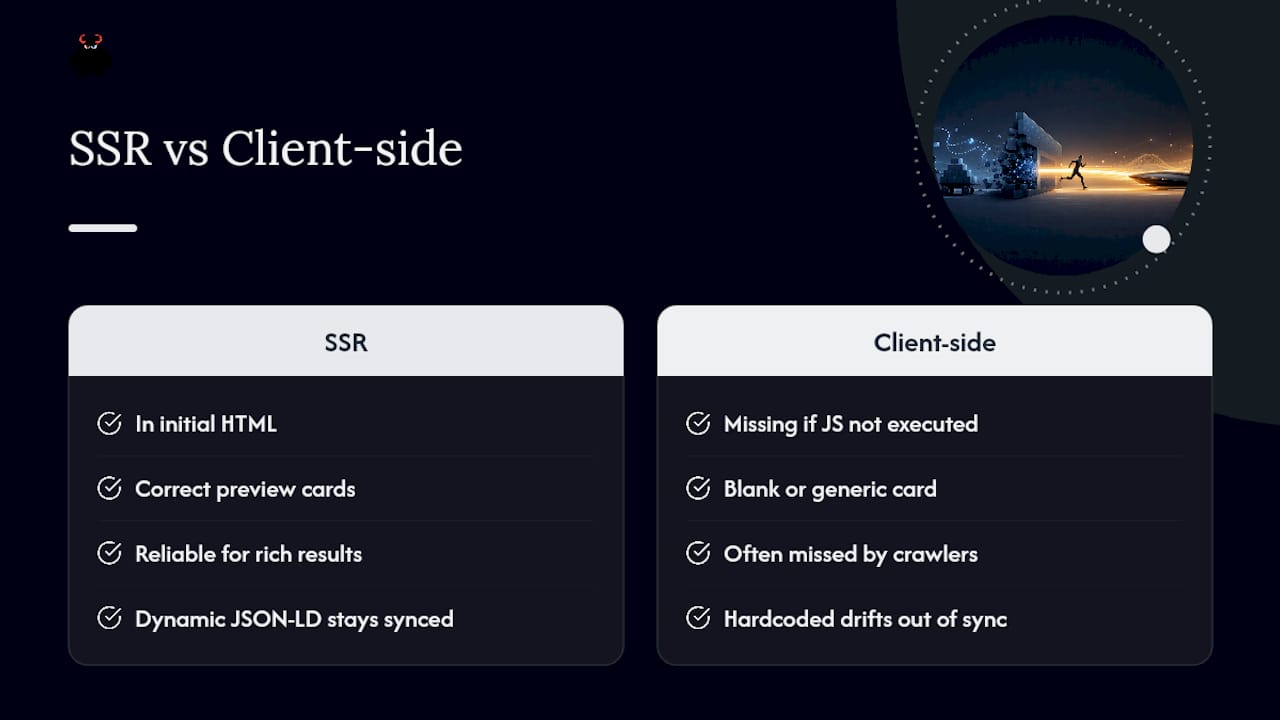
Rich snippets, star ratings, FAQ dropdowns, breadcrumb trails, depend entirely on structured data being present and parseable at crawl time. Social platforms have an even less forgiving requirement: most social crawlers, including Facebook’s and LinkedIn’s link preview bots, don’t execute JavaScript at all when generating a share preview.
That means Open Graph tags and Twitter Card metadata injected by client-side JavaScript simply won’t appear when someone shares your page. The social crawler grabs whatever’s in the initial HTML response and moves on. If your og:title, og:image, and og:description tags only populate after a React component mounts, every social share of that page renders a blank or generic preview card, which quietly kills click-through from social referral traffic.
SSR fixes this by construction: the meta tags exist in the same HTML the social crawler receives on its single, non-JavaScript pass. The same logic extends to JSON-LD structured data for search rich snippets. Embedding comprehensive JSON-LD through the server-side rendering layer, as Art of SEO’s implementation guidance lays out, increases how reliably search engines can parse that data into an actual rich result rather than skipping it due to a rendering timing gap.
The practical implementation detail worth flagging: dynamic JSON-LD, built from the same server-side data fetch that populates the visible page content, stays synchronized with what’s on the page automatically. Hardcoded or client-injected JSON-LD tends to drift out of sync with real content over time, which creates a structured data mismatch that search engines can flag as a quality signal against the page.
SPAs With Client-Side Routing: What Changes With SSR
Single-page applications built with client-side routers, React Router, Vue Router, and similar tools, create a specific SEO problem that framework-level SSR solves only partially. The router intercepts navigation clicks and swaps content without a full page reload, which is great for user experience but means every “page” after the first one never triggers a fresh server request in a pure CSR setup.
Adding SSR to a SPA means the first request for any given URL gets fully rendered HTML, whether that URL is your homepage or a deep product page a crawler discovers through a sitemap. Subsequent client-side navigation within the app still uses the router as before, but that’s fine, because the crawler that matters treats every URL as its own initial request, not as a navigation event within a session.
The failure mode to watch for is inconsistent SSR coverage across routes. Teams often SSR their homepage and top-level pages carefully, then let a component library or a lazy-loaded route fall back to client-only rendering for deeper pages. Every URL you want indexed needs the same server-rendering guarantee, not just the ones you tested first.
Canonical tags need particular attention in SPA architectures, since client-side routing can produce multiple URL variations, trailing slashes, query parameters, hash fragments, that resolve to visually identical content. Standardize canonical logic on the server so every variant of a route points to one authoritative URL, rather than leaving the router’s URL handling to decide it implicitly.
Keeping SSR Performance Honest After Launch
Shipping an SSR migration is the easy part. The harder, ongoing work is catching the slow regression that creeps in over months as new features, new third-party scripts, and new content types get added to pages that used to be fast and fully indexable.
Lighthouse and WebPageTest remain the right tools for synthetic, repeatable snapshots, but they only tell you about the specific pages and conditions you test. Real User Monitoring closes that gap by capturing actual field data, real devices, real network conditions, real hydration timing, across your full traffic, which is where most silent CLS and TTI regressions actually get caught first.
Search Console’s Core Web Vitals report adds the field-data view Google itself uses for ranking signals, grouped by URL pattern rather than individual page, so a slow template affecting thousands of pages shows up as a pattern rather than a one-off anomaly. Pair that with a scheduled Screaming Frog or ScreamingCAT crawl comparing raw HTML against rendered HTML monthly, so metadata or structured data regressions get caught before a quarterly audit finds them the hard way.
The discipline that separates teams who keep their SSR investment paying off from teams who watch it decay is treating these checks as a recurring operational task, not a one-time launch checklist. Our guidance on preparing for Google’s Page Experience signals covers how these monitoring practices tie directly into ranking stability over time.
The Practical Take: Rendering Strategy Is an Operations Decision
Hybrid, per-page rendering beats any single dogmatic choice. Pick SSG where content barely changes, SSR where it changes constantly and must be indexed, and measure success through organic traffic and Core Web Vitals rather than which framework buzzword you shipped. Treat testing as continuous, not a pre-launch checkbox, because rendering regressions creep in quietly and cost you rankings before anyone notices the drift.
- Vector
Get Your SSR Implementation Audited and Monitored
Most agencies will tell you to “add SSR” and leave you to figure out the caching rules, the hydration strategy, and the CI gates that keep it from breaking six months later. The whole system includes the migration plan, managed hosting layer, and monitoring that catches a metadata regression before it costs a ranking position.

Our Web Design & Development team handles SSR, SSG, and ISR implementations on managed infrastructure, so the caching and edge configuration that protects your Time to First Byte doesn’t fall on your internal team to maintain. Paired with our SEO, AEO & GEO services, you get ongoing crawl audits and structured data checks instead of a one-time launch report that goes stale in a month.
If you’re weighing an SSR migration or suspect your current setup is quietly leaking organic visibility, request an audit through our services overview and we’ll map out exactly where your rendering strategy is helping or hurting your indexing before you commit engineering time to a fix.
Sources
- SSR vs CSR SEO: A Technical Comparison for SEOs & Devs
- SEO: Rendering Strategies | Next.js
- Dynamic rendering (Google Developers)
- How to Improve Server-Side Rendering for SEO in 2026 - Art of SEO
FAQ
Is SSR Better Than CSR for SEO?
Yes, for any page that needs to rank in search results. SSR delivers complete HTML on the first request, which removes the indexing delay that comes with Google’s deferred JavaScript rendering queue, while CSR pages must wait for a second rendering pass before their content becomes visible to crawlers.
What Is Server-Side Rendering?
Server-side rendering builds the full HTML for a page on the server, then sends that complete markup to the browser or crawler on the first request. This differs from client-side rendering, where the server sends a mostly empty shell and JavaScript builds the visible page after it loads in the browser.
What Does Rendering Mean in SEO?
Rendering refers to the process of turning code, HTML, CSS, and JavaScript, into a visible, indexable page. In SEO, rendering matters because search engines need to see your final content and links to index them, and how quickly and reliably that rendering happens determines how fast and completely your pages get indexed.
Is SSR Better Than a Single-Page Application?
SSR and single-page applications aren’t strictly opposites. You can build a SPA with client-side routing and still add SSR for the initial page load, which gives you both the app-like navigation experience and reliable indexing. A pure client-rendered SPA with no server rendering carries real indexing risk for any page meant to rank organically.
Does SSR Slow Down My Website?
SSR can increase Time to First Byte because the server has to fetch data and build HTML before responding, but it typically improves First Contentful Paint and Largest Contentful Paint since the browser gets usable markup immediately. Edge functions and CDN caching, as Art of SEO recommends, reduce that TTFB cost significantly.
Should I Use SSG Instead of SSR?
Use SSG for pages that rarely change, like marketing pages or documentation, since it delivers the fastest possible load with the lowest server cost. Reserve SSR for pages where the content changes frequently and must stay current for both visitors and search engines, like product listings with live inventory.
Does Google Recommend Dynamic Rendering as a Fix for JavaScript SEO?
No. Google’s own documentation describes dynamic rendering, serving a separate pre-rendered version to bots, as a workaround rather than a recommended long-term solution, largely because maintaining two versions of a page adds complexity and cloaking risk.
How Do I Test Whether My SSR Setup Is Actually Working?
Compare a no-JavaScript crawl of your site against a fully rendered crawl using a tool like Screaming Frog or ScreamingCAT’s testing methodology. If critical content, links, or meta tags appear in one version but not the other, your SSR implementation has gaps that need fixing before you trust it.
Does SSR Help With Rich Snippets and Social Media Previews?
Yes. Most social crawlers don’t execute JavaScript, so Open Graph tags and JSON-LD structured data need to exist in the server-rendered HTML to appear correctly in rich snippets and social share previews. Injecting that data purely on the client side, as implementation guidance confirms, leaves those previews blank or generic.