
Three checks stop most of the waste in any Google Ads account: measurement integrity (Consent Mode v2 and enhanced conversions), search-term and negative keyword discipline, and automation guardrails on Performance Max and AI Max campaigns. Audited accounts commonly waste 20% to 40% of spend on traffic that never converts, and structured negative keyword work alone recovers a meaningful share of it. Monstrous Media Group treats these three checks as the entry point for every account review, because fixing them first protects revenue before anything else gets touched.
TL;DR:
- Fix measurement integrity issues like Consent Mode v2 configurations and enhanced conversions match rates above 50% to ensure reliable data for optimization.
- Regularly review search-term reports for high-cost zero-conversion queries and add negative keywords at campaign or account level to reduce waste.
- Maintain a clear naming and segmentation structure to prevent account cannibalization and improve automated bidding performance.
- conduct weekly review of search terms and pacing, with quarterly audits of account structure, to continuously identify and recover wasted spend.
- Always verify that landing pages match ad messaging and load speed standards to maximize conversion rates and ad relevance.
Table of Contents
- What Should A Google Ads Audit Fix First?
- How Do You Validate Google Ads Measurement?
- Why Does Account Structure Cause Wasted Spend?
- How Do You Audit Search Terms And Negative Keywords?
- How Do You Audit Performance Max And AI Campaigns?
- Is Your Bidding Strategy Actually Working?
- Are Your Ads And Assets Actually Working?
- Does Your Landing Page Match The Ad?
- How Often Should You Audit A Google Ads Account?
- What Does A Systems-First Audit Look Like?
- What Do Most Audits Miss?
- Get Your Google Ads Account Reviewed The Right Way
- Sources
What Should A Google Ads Audit Fix First?
The first 90 minutes of any account review matter more than the next ten hours. Before you touch bids, budgets, or ad copy, you need to know whether the account’s data can be trusted. Fix the wrong thing first and you will optimize toward broken signals.
Work through this sequence in order:
- Confirm conversions are firing and Consent Mode is configured correctly. Check the Google Ads conversion diagnostics page for each conversion action and cross-reference against GA4 real-time events.
- Pull the last 90 days of search terms and sort by cost, descending, for queries with zero conversions. This single report usually surfaces the biggest waste.
- Pause or tighten broad match keywords in campaigns showing weak or no conversion signal. Don’t kill broad match everywhere. Kill it where the data can’t support it.
- Verify enhanced conversions match rates inside the diagnostics tab. A match rate under 50% means your bidding algorithm is working half blind.
- Check campaign pacing against monthly budgets. A campaign that spent 80% of its budget by day 12 is either underfunded or leaking spend on the wrong queries.
Quantify what you find as you go. If a search term burned a noticeable amount with zero conversions over 90 days, that is potentially recoverable by adding one negative keyword. Add up every zero-conversion query above a reasonable cost threshold and you’ll usually have a real number to report before lunch.
The rule of thumb: pause when a keyword or placement has spent past your typical cost-per-conversion with zero conversions and no seasonal excuse. Adjust, rather than pause, when the signal is weak but directionally positive.
Pro Tip: Set up a scheduled search-terms report and a labeling system (Critical, High, Medium) inside Google Ads so the triage runs itself every Monday morning instead of consuming a half day every quarter.
How Do You Validate Google Ads Measurement?
Everything downstream of a Google Ads account audit depends on whether the platform’s optimization signals are real. This is the section most audits skip, and it’s the one that invalidates every other finding if it’s wrong.
Start with consent. Consent Mode v2 became the single gate for GA4 data flowing into Google Ads after Google retired Google Signals as the older control mechanism. If your consent banner misfires, whether from a delayed load, a regional configuration gap, or a broken cookie-clear flow, your audiences and conversion counts silently degrade with no error message anywhere in the interface.
Test it directly:
- Open Google Tag Assistant or a similar tag debugger and watch the
ad_storageandanalytics_storagesignals toggle as you accept and decline consent, on desktop and mobile. - Clear cookies and reload to confirm the banner reappears and re-fires correctly, rather than defaulting to a stale “granted” state.
- Check consent behavior in at least one region with strict requirements (the EU is the obvious test case) even if your primary market sits elsewhere, since a template misconfiguration often affects every region equally.
Next, check enhanced conversions. Google’s own diagnostics documentation walks through the setup, but the failure modes worth hunting for are specific: hashed email fields that never populate because of a GTM trigger firing before the form submits, gtag.js implementations missing the enhanced_conversions parameter entirely, or a mismatch between the checkout confirmation page and the tag’s firing conditions.
Statistic Callout: Properly configured enhanced conversions typically produce a 5% to 15% lift in reported conversions compared to standard tracking, according to patterns documented across 2026 audit templates. If your account shows no lift after implementation, something in the match logic is broken, not absent.
Finally, confirm you have a single source of truth. De-duplicate conversion actions so the same purchase isn’t counted twice under two different tags, and separate primary optimization events (purchases, qualified leads) from observation-only events (newsletter signups, page-depth milestones) that shouldn’t be driving your Smart Bidding targets.
Document everything as you go. Export the diagnostics screen, screenshot the match-rate percentage, and note the date. That evidence becomes your baseline for measuring whether fixes actually worked next quarter, and it’s the difference between an audit that produces opinions and one that produces proof.
Why Does Account Structure Cause Wasted Spend?
Poor structure doesn’t just look messy. It actively cannibalizes performance by making the algorithm bid against itself and making reporting impossible to trust.
Start with naming conventions. A campaign named “Campaign 3” tells you nothing six months later. Segment by intent, brand versus non-brand, and by product category or service line, so a glance at the campaign list tells you what each one is supposed to do:
- Use a consistent naming pattern (Brand_Search_Nonbrand or a similar structure) across every campaign so filtering and reporting stay usable at scale.
- Apply labels for audit status (Reviewed_Q1, Needs_Fix) so the next audit doesn’t start from zero.
- Segment brand and non-brand into separate campaigns with separate budgets, since blending them hides how much of your “performance” is just people searching your company name.
Then hunt for duplication. Two ad groups bidding on the same close-variant keyword, or two campaigns targeting the same audience with overlapping budgets, force Google’s auction to compete with itself. You lose impression share to your own account, and your cost-per-click climbs for no reason.
The fix is usually consolidation, not deletion. Merge overlapping ad groups into one with the strongest ad copy, keep the keyword with better historical data, and pause the redundant version rather than deleting it (you may want the history later).

Structure also dictates what bidding strategies can even work. A campaign fragmented across ten tiny ad groups can’t feed Smart Bidding enough conversion volume per group to learn effectively. Consolidating structure often does more for automated bidding performance than adjusting the bid strategy itself.
How Do You Audit Search Terms And Negative Keywords?
This is the highest-return hour in the entire audit. Negative keyword work is consistently cited as the single fastest correction for wasted spend, and it doesn’t require touching bidding strategy, creative, or landing pages at all.
Work through it in this order:
- Export the search terms report for the last 90 days across every active campaign, filtered to show cost and conversions side by side.
- Sort by cost, descending, and scan the top 50 rows for anything irrelevant to what you actually sell. This catches the obvious offenders fast.
- Add negatives at the right level. Irrelevant terms that show up across the whole account belong at the account-negative list level. Terms that are only wrong for one campaign’s intent belong at the campaign level.
- Reassess broad match keywords specifically. Broad match only earns its keep when you have a strong, reliable conversion signal feeding the algorithm. Where that signal is thin, apply negative keywords aggressively and consider a tighter match type until volume builds.
- Schedule a recurring review, weekly at minimum for high-spend accounts, to keep the negative list current and catch brand-bleed (competitors or unrelated brands triggering your ads) before it compounds.
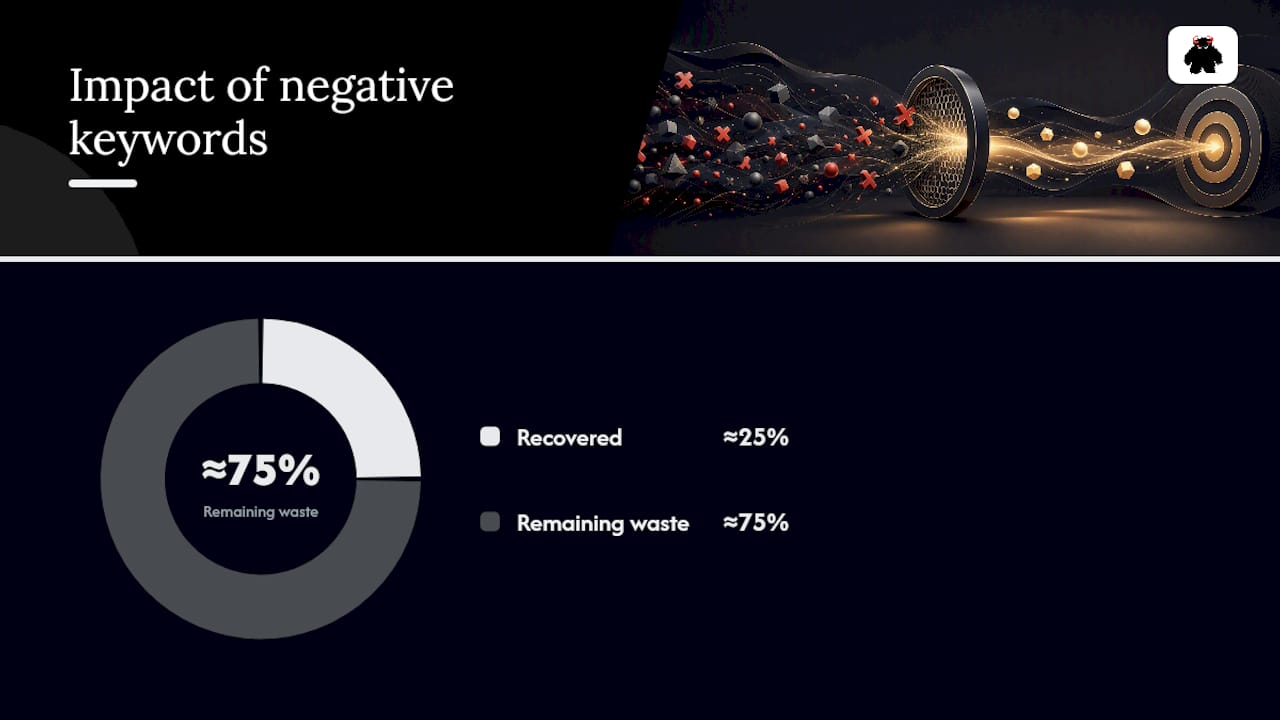
Negative keyword corrections recover roughly a quarter of typical wasted spend in accounts that had none in place, based on patterns across audited accounts. That’s not a one-time fix. It’s a maintenance habit that decays the moment you stop.
Pro Tip: Build a shared negative keyword list at the account level for universal exclusions (competitor brand names, “free,” “jobs,” “DIY”) and apply it across every campaign in one move rather than rebuilding the same list campaign by campaign.
How Do You Audit Performance Max And AI Campaigns?
Performance Max used to be a black box. That changed materially with reporting updates that exposed channel-level distribution and asset-level performance data for the first time, and a 2026 Google Ads account audit that skips this reporting is auditing half an account.
Pull these reports specifically:
- Channel distribution to see whether your Performance Max budget is landing on Search, Display, YouTube, or Discover, and whether that split matches your actual intent for the campaign.
- Search themes and insights reports to catch queries the campaign is chasing that have nothing to do with your offer.
- Asset-level performance to identify which headlines, images, and descriptions are earning “Best” ratings versus getting throttled to near zero.
- Placement exclusions and brand exclusions, since Performance Max can serve on placements or alongside content you’d never approve manually if left unchecked.
Verify URL expansion settings next. If Google’s final URL expansion is enabled, the system can send traffic to pages you didn’t select. Confirm that’s intentional and check the “where ads showed” report for surprises like ads landing on your careers page instead of a product page.
Check asset-generation permissions too. If AI-generated assets are enabled, confirm someone has reviewed the actual generated headlines and images for accuracy and brand fit, particularly in regulated industries where an auto-generated claim could create a compliance problem. If DSA (Dynamic Search Ads) features are still active anywhere in the account, document whether that’s a deliberate choice or a legacy setting nobody revisited, since Google continues shifting DSA functionality into Performance Max and AI Max over time.
Is Your Bidding Strategy Actually Working?
Smart Bidding is only as good as the conversion data feeding it. An audit needs to confirm the inputs before trusting the outputs.
- Check whether each campaign has enough monthly conversion volume to support the automated strategy it’s running. A Target CPA campaign with eight conversions a month doesn’t have enough data for the algorithm to learn reliably.
- Compare the CPA or ROAS target against your actual unit economics, not against what “feels achievable.” A target set below true breakeven guarantees the algorithm chases unprofitable volume.
- Review pacing against the calendar. A budget spending unevenly, heavy at month start and starved by month end, signals a budget cap that’s too tight for the bid strategy’s ambitions.
Statistic Callout: Combine zero-conversion search-term spend with underperforming placement spend and most accounts land inside that 20% to 40% wasted-spend range auditors see repeatedly. Filter your search terms and placement reports by cost with zero conversions to find your account’s specific number.
Finally, sanity-check what Google reports against your CRM. If Google Ads shows 40 conversions this month but your sales team only logged 25 qualified leads, you have a tracking gap, a lead-quality gap, or both, and no amount of bid adjustment fixes that mismatch.
Are Your Ads And Assets Actually Working?
Check ad strength ratings across every ad group. “Poor” or “Average” ratings usually mean insufficient headline and description variety, which limits how well Google can test combinations.
- Confirm every active ad group has enough Responsive Search Ad assets to give the algorithm real combinations to test, not just three headlines copied from last year.
- Review extension coverage (sitelinks, callouts, structured snippets) since missing extensions cost you real estate competitors are claiming.
- Audit final URLs and tracking parameters for broken links or missing UTM tags, especially after a website migration.
- Check the disapprovals tab and resolve or appeal anything flagged, since a disapproved ad in an ad group quietly reduces your effective competition for that auction.
- Review any AI-generated asset for accuracy before it runs unsupervised, particularly in finance, health, or legal verticals where a fabricated claim creates real liability.
Pin only when necessary. Over-pinning defeats the purpose of Responsive Search Ads by preventing the algorithm from testing combinations.
Does Your Landing Page Match The Ad?
A perfect campaign sending traffic to a slow or mismatched landing page wastes everything upstream of it. Run these checks fast:
- Test load speed and Core Web Vitals on mobile specifically, since that’s where most paid traffic lands first.
- Confirm the headline and offer on the page match the ad’s promise word for word, or close to it. Message-match gaps quietly kill Quality Score and campaign relevance.
- Verify the tracking pixel actually fires on page load and again on form submission, not just one or the other.
- Test the form or checkout flow yourself, on both desktop and mobile, before trusting any conversion number tied to it.
Pro Tip: Run a rapid A/B test on the headline and primary call-to-action before committing to a full landing page rebuild. Small, high-impact fixes, like moving the form above the fold, often move conversion rate more than a full redesign.
How Often Should You Audit A Google Ads Account?
Score every finding Critical, High, or Medium. A misfiring consent banner is Critical. A missing sitelink extension is Medium. That distinction is what turns a long list of findings into an actual implementation roadmap instead of an overwhelming document nobody acts on.
Recommended cadence follows a simple rhythm: weekly triage on search terms and pacing, monthly checks on conversion health and match rates, and a full quarterly structural audit covering everything above.
| Cadence | Focus | Owner |
|---|---|---|
| Weekly | Search terms, pacing, disapprovals | In-house or agency analyst |
| Monthly | Conversion health, match rates, budget review | Account lead |
| Quarterly | Full structural audit, PMax reporting, bidding review | Senior strategist or agency |
Track audit impact the same way every quarter: recovered wasted spend, conversion rate change, and match-rate improvement, so stakeholders see a trend line instead of a one-time report.
What Does A Systems-First Audit Look Like?
Monstrous Media Group runs Google Ads account audits as measurement-first diagnostics, not spreadsheet exercises. That distinction shows up in the deliverable:
- Every audit starts with tracking validation before a single bid or budget gets touched.
- Findings get scored Critical, High, or Medium and tied to an implementation timeline, not left as a static PDF.
- Accounts running on MonsterWP-managed infrastructure get first-party data and server-side tracking built into the fix, not bolted on afterward.
- The goal is always revenue protection: recovered wasted spend and improved ROAS, reported as outcomes, not activity logs.
What Do Most Audits Miss?
Three failure modes show up again and again, and none of them are visible from the campaign dashboard. Consent-mode misfires hide in plain sight because the account still shows conversions, just fewer than it should. Enhanced-conversion mismatches look identical to normal tracking until you check the match-rate percentage directly. Performance Max brand leakage, where a chunk of “new customer” budget is actually just capturing branded search, only shows up once you pull the search-insights report and read it line by line.
The shortcuts worth building are procedural, not clever: a scheduled weekly search-terms report, an approval gate before any automated recommendation gets applied, and a documented emergency-pause procedure so nobody has to figure out how to stop the bleeding at 2 a.m. during a tracking outage.
- Vector
Get Your Google Ads Account Reviewed The Right Way
Most agencies hand you a slide deck full of observations and call it an audit. Monstrous Media Group builds the fix into the diagnosis. If a Google Ads audit surfaces a Consent Mode gap, a Performance Max leakage problem, or a bidding strategy starved of real signal, the same team that found it implements the correction, connects it to first-party measurement infrastructure, and reports the recovered spend in dollars, not slides.

That matters because a report that just lists problems doesn’t stop the bleeding. Monstrous Media Group’s paid search advertising and PPC management service runs the full loop: audit, measurement rebuild, landing page alignment, and ongoing management, so the account doesn’t drift back into the same 20% to 40% waste range six months later. For accounts where the ad platform’s tracking depends on the site itself, pairing the audit with managed website infrastructure closes the gap between what Google Ads reports and what the business actually collects.
If you run paid acquisition for a SaaS product specifically, message match between ad and landing page carries even more weight, and resources like Google Ads strategies built for SaaS buyers are worth reviewing alongside your own funnel.
Request a Google Ads account review from Monstrous Media Group and get a scored, prioritized list of what to fix first, along with a plan for who fixes it and when.
Sources
- Google Ads Audit: The 2026 Checklist | MarqOps
- Free Google Ads Account Audit Template | Online Labs | 2026
- Google Ads Audit: How to Review an Account in 40+ Checks
- Support