
Yes, use AI for Google Ads, but treat it as a system, not a button. Enable Google’s built-in AI features first, layer in selective third-party automation only where a human still signs off on changes, and lock your conversion tracking before you touch broad match or final URL expansion. The upside is real, but so is the downside if measurement is wrong. Run your audit checks first, then scale.
TL;DR:
- Using AI features like AI Max for Search campaigns can increase conversions, but it requires careful setup, including correct conversion and call tracking.
- Human oversight remains critical, especially for review and approval of automatic suggestions and generated assets, with a focus on audit trails and rollback plans.
- Third-party AI tools vary in complexity and cost, ranging from rule-based engines to autonomous agents, and should be evaluated against specific account needs and data privacy policies.
- Proper onboarding steps include baseline performance measurement, test period monitoring, negative keyword management, and critical asset pinning to prevent wasted spend.
- Random fast adoption without proper checks leads to risks like low-intent queries, policy issues, and measurement errors, emphasizing the value of an audit-first, managed approach.
MonstrousmediagroupProtect Revenue With Smarter SystemsMonstrous Media Group builds AI-enabled SEO, SEM, web, and marketing systems focused on outcomes instead of busywork.Explore Monstrous Media Group
Table of Contents
- What AI Actually Changes in Your Google Ads Account
- Google-Built AI Features to Understand Before You Flip the Switch
- Third-Party AI Tooling: What Each Category Actually Automates
- How to Evaluate and Choose an AI Approach for Google Ads
- Implementation Checklist: Deploy AI Without Bleeding Budget
- MMG Practitioner Perspective: Audit Checks and Revenue Protection
- Executive View: Governance Beats Headcount
- Managed AI-Enabled Google Ads Systems From Monstrousmediagroup
- Sources
- FAQ
What AI Actually Changes in Your Google Ads Account
AI has moved from a bidding feature to the operating layer of the entire account. It now touches four distinct jobs inside a Google Ads campaign, and each one carries a different risk profile.
Automated bidding sets and adjusts bids in real time based on conversion signals, competition, and device context. Search-term expansion lets the system match your ads to queries you never typed as keywords, based on intent rather than exact wording. Asset generation writes and assembles headlines, descriptions, and images from your existing site content. Forecasting and anomaly detection flag spend spikes or conversion drops before a human would catch them in a weekly report.
Each capability produces a different kind of value:
- Automated bidding trims manual bid adjustments and reacts to auction shifts faster than a human trader can.
- Search-term expansion surfaces converting queries that a narrow keyword list would have missed entirely.
- Asset generation cuts creative production time, especially for accounts running dozens of ad groups.
- Anomaly detection catches tracking breaks or budget overruns inside hours instead of days.
Google’s own data on AI Max for Search campaigns shows the scale of what is possible: accounts typically see a notable increase in conversions or conversion value at a similar cost per acquisition or return on ad spend, and accounts moving from exact or phrase match into AI Max have seen even higher uplifts.
If you’re already on broad match with strong negative keyword lists, your ceiling is lower, and the gains come mostly from asset optimization rather than query expansion.
The main risk vectors are wasted spend on low-intent queries, creative that technically matches a query but misses buyer intent, and policy flags on generated assets that pause ad delivery without warning. None of these are hypothetical. They are the predictable cost of turning on expansion features without guardrails.
Google-Built AI Features to Understand Before You Flip the Switch
Google ships four AI features directly inside the platform, and each one requires a different level of oversight.
AI Max for Search campaigns extends your existing search campaigns with broader search-term matching, automatic asset optimization, and final URL expansion. It works within your current campaign structure rather than replacing it, which makes it the lowest-friction entry point into AI-driven search. The uplift data above comes directly from this feature, and Google frames it as an extension layer, not a rebuild.
Smart Bidding is the automated bidding engine behind Target CPA, Target ROAS, and Maximize Conversions strategies. It works well once an account has enough conversion volume to train on, but Google’s own guidance on steering AI-powered search ads warns that bid strategies need a learning window and should be adjusted using the built-in simulators rather than gut instinct. Change too many variables at once and the algorithm resets its learning, which tanks performance for days.
Ask Advisor is a Gemini-powered assistant built into the Google Ads interface. It reviews your account and surfaces suggestions in plain language, but Google’s own documentation is explicit that it requires human review and approval before any suggestion gets applied. Treat it as a second set of eyes, not an autopilot.
Generative asset tools create headlines, descriptions, and images from your landing pages. Every generated image carries a SynthID watermark, and Google’s policy documentation requires eligibility checks and compliance review before assets go live.
Pro Tip: Turn on AI Max for one campaign first, not the whole account. Compare its search terms report against your legacy campaigns weekly for a month before expanding it further.
Third-Party AI Tooling: What Each Category Actually Automates
Outside Google’s own ecosystem, third-party AI tools for Google Ads fall into five functional categories. Knowing which category solves your actual problem matters more than knowing which vendor has the best demo.
- Autonomous agents manage bids, budgets, and even campaign structure with minimal human input, best suited to enterprise accounts with large historical data sets and a team that can audit machine decisions weekly.
- Bid-rule engines apply conditional logic (“if CPA exceeds X, reduce bid by Y%”) rather than full autonomy, a better fit for in-house teams that want automation without giving up bid strategy control.
- Anomaly detection and alert systems watch for spend spikes, conversion drops, or tracking breaks and notify a human, which works for any account size and carries the lowest operational risk.
- Creative generators produce ad copy and visual variations at scale. A tool like AmmarAI’s ad generator handles multi-channel ad copy production, useful for teams running the same offer across several platforms.
- Analytics assistants layer natural-language querying on top of Google Ads and GA4 data, giving non-technical stakeholders a way to ask questions about performance without building a dashboard first.
Cost shapes vary sharply by category. Rule engines and alert systems tend toward flat monthly subscriptions in the low hundreds of dollars. Autonomous agents and enterprise analytics platforms often price on percentage of managed spend, which means the tool’s cost scales with your budget whether or not performance does. Integration also matters: agents and analytics assistants typically need API access and sometimes Manager Account (MCC) permissions, which means you are sharing account-level data with a third party. Confirm what happens to that data before granting access.
How to Evaluate and Choose an AI Approach for Google Ads
Before adopting any AI tool, whether Google-built or third-party, run it against six evaluation criteria.
- Data readiness. Does your account have enough conversion volume (Google generally recommends 30+ conversions per month per campaign) for the system to learn from?
- KPI alignment. Does the tool optimize toward the metric you actually care about, or toward a proxy metric like clicks that looks good but doesn’t pay the bills?
- Human-in-the-loop controls. Can a person review and approve changes before they go live, or does the system push changes automatically?
- Transparency and explainability. Can you see why the system made a decision, or does it operate as a black box?
- Rollback capability. How fast can you revert to a previous bid strategy or budget setting if performance drops?
- Privacy and policy compliance. Does the tool’s data handling match your account’s advertiser policies and your customers’ data expectations?
Turn those six criteria into direct questions for any vendor or internal team proposing an AI tool:
- What conversion volume do you require before results stabilize?
- Can I export a change log of every automated decision?
- What is the rollback process if performance drops 20% in a week?
- Does this tool require MCC-level access, and what data does it retain?
- What happens to my account’s historical data if I cancel?
Red flags worth walking away from: opaque decisioning with no change log, no documented rollback process, and any promise of a guaranteed ROAS multiple without first reviewing your account’s historical data. A peer-reviewed review of AI advertising research flags exactly this pattern: automation that promises ROI gains without addressing personalization risk or trust erosion tends to underdeliver once deployed at scale.
Pro Tip: Ask any vendor to show you a real change log from an existing client account, redacted for confidentiality. If they can’t produce one, they don’t have the audit trail they’re claiming to offer.
Implementation Checklist: Deploy AI Without Bleeding Budget
Run these steps in order, before enabling any expansion feature.
- Confirm conversion tracking fires correctly on every conversion action, including calls and form fills.
- Set a documented baseline for CPA, ROAS, and conversion volume from the last 30 days.
- Establish a spend cap and a fixed test window, generally 2 to 4 weeks, before judging results.
- Enable brand exclusions and refresh your negative keyword list before turning on broad match or AI Max.
- Pin critical assets (headlines with pricing, compliance language) so generative tools can’t remove them.
Once live, monitoring replaces guesswork:
- Configure anomaly alerts for spend spikes and conversion drops.
- Check performance daily for the first two weeks of any new feature.
- Run a full KPI review weekly against your documented baseline.
- Keep a one-click rollback plan ready for every bid strategy change.
MMG Practitioner Perspective: Audit Checks and Revenue Protection
Most wasted Google Ads spend isn’t caused by AI. It’s caused by AI amplifying a tracking gap that was already there. Monstrousmediagroup’s own audit framework, Three Audit Checks That Stop 20–40% Waste in Your Google Ads Account, targets mis-tracked conversions, unmanaged broad-match spend, and missing call-tracking, which together account for that waste range.
Call-tracking deserves particular attention when AI is running the bidding. If a meaningful share of your conversions happen by phone and aren’t tracked, Smart Bidding optimizes against an incomplete signal, which means it’s making decisions on partial information. The setup process is covered in Protect Revenue With Call Tracking in Google Ads, and it’s the single fastest fix for accounts running AI-driven bidding on service or lead-gen offers.
- Verify every conversion action against actual CRM or sales data monthly.
- Audit broad-match search terms weekly during any AI Max test window.
- Confirm call tracking is live before enabling Smart Bidding on lead-gen campaigns.
- Vector
Executive View: Governance Beats Headcount
Automate execution, keep strategy in-house. AI can run bids and generate assets; it can’t set your margin targets or decide which markets matter this quarter. As automation absorbs manual bid adjustments, your team’s role shifts toward audits, creative governance, and approval workflows. Institutionalize a test plan template, a change-approval path, and an escalation route for when performance drops, before you scale AI adoption past a single campaign.
Managed AI-Enabled Google Ads Systems From Monstrousmediagroup
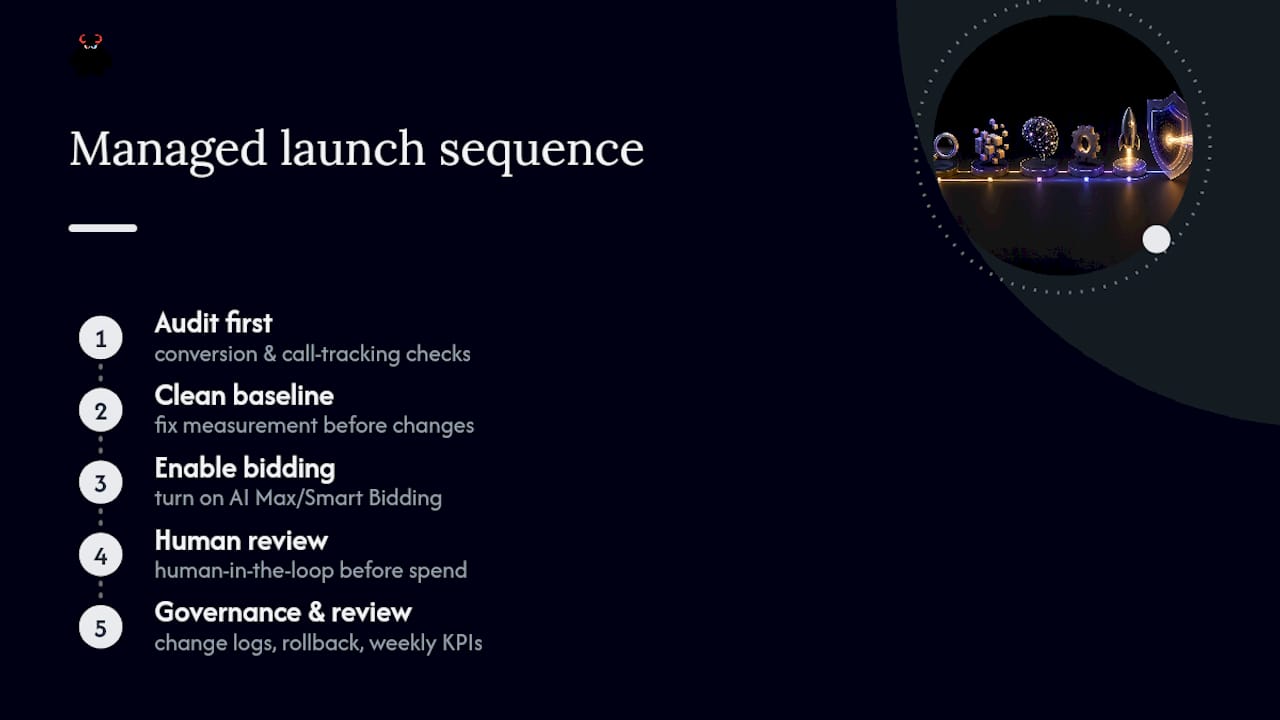
If everything above sounds like a full-time job, that’s because it is one. A managed service builds systems with Google-built AI features enabled correctly, third-party automation added only where it earns its cost, and human-in-the-loop review baked into every workflow before a dollar moves.

What sets a managed engagement apart from flipping switches yourself is the audit-first sequencing. Conversion-tracking and call-tracking checks are performed before adjusting any bid strategy, so AI Max or Smart Bidding gets turned on against clean data instead of a broken measurement baseline. Governance is built directly into the account structure: change logs, rollback plans, and weekly KPI reviews are standard practice.
If you want a managed, revenue-protected approach to paid search advertising and PPC management. Request a consultation and get an account audit before any AI feature gets flipped on.
Sources
Claims in this guide draw on Google’s own product documentation for AI Max, Smart Bidding, and Ask Advisor, alongside peer-reviewed research on AI advertising risk and adoption.
- Introducing AI Max for Search campaigns - Google
- How to steer AI-powered search ads - Google Ads Help
FAQ
What AI Is Good for Google Ads?
Google’s own built-in features, AI Max for Search campaigns, Smart Bidding, and Ask Advisor, are the strongest starting point because they’re native to the platform and backed by Google’s uplift data. Third-party tools become worth adding once you need capabilities Google doesn’t offer, like cross-platform creative generation.
Is $20 a Day Good for Google Ads?
$20 a day can work for a narrow, local, low-competition campaign, but it rarely generates enough conversion volume for Smart Bidding to learn effectively across multiple ad groups. Most accounts need to concentrate that budget on one or two tightly focused campaigns rather than spreading it thin.
Is $500 a Month Enough for Google Ads?
A modest monthly budget is workable for a single-location service business in a low-competition market, but it limits how many keywords, campaigns, or AI features can run simultaneously without starving each one of data. Expect to prioritize one channel or match type rather than testing several at once.
Is $10 a Day Enough for Google Ads?
A daily budget on the lower end of scale is enough to test a single, narrow keyword theme, but it’s below the volume most automated bidding strategies need to optimize reliably. At this level, manual or rule-based bidding often outperforms Smart Bidding simply because there isn’t enough conversion data for the algorithm to learn from.
Does AI Max Replace My Existing Search Campaigns?
No. AI Max extends your current search campaigns with broader query matching and asset optimization rather than replacing the campaign structure you already have.
How Long Does Smart Bidding Need to Learn?
Smart Bidding typically needs a learning period after any major change, and Google’s guidance recommends using built-in simulators before adjusting targets again to avoid resetting that learning window.
Can Ask Advisor Make Changes to My Account Automatically?
No. Ask Advisor surfaces suggestions inside the Google Ads interface, but Google’s documentation confirms a human must review and approve every change before it applies.
What’s the Biggest Risk of Turning on AI Features Too Fast?
Untracked or mis-tracked conversions are the biggest risk, since AI-driven bidding optimizes against whatever signal it’s given, and a broken tracking setup means it’s optimizing against the wrong data entirely.
Do Generated Ad Images Need Special Disclosure?
Yes. Google’s generative image tools apply SynthID watermarking automatically, and advertisers still need to run policy compliance checks before those assets go live, per Google Ads Help.
Should a Small Business Manage AI-Driven Google Ads In-House or Hire an Agency?
It depends on available time and data literacy. In-house teams with strong conversion tracking and time for weekly audits can manage Google-built AI features directly, while businesses that lack that bandwidth typically get more consistent results from a managed provider like Monstrousmediagroup’s paid search team.