Yes, you can produce testimonial videos that move prospects, but only when you treat them as a system rather than a one-time creative project. Video content built around real customer outcomes builds trust faster than almost any other marketing asset, and it works because it pairs a believable human voice with a measurable result. HubSpot’s testimonial video guidance frames the format the same way: a real customer story, told with specificity, showing what changed after the purchase.
Here’s the practical breakdown. A remote, DIY-style shoot can be planned and delivered in one to two weeks. A hybrid approach, where a producer directs remotely but the client handles filming, typically runs two to four weeks. A full-service production with a crew on-site usually takes four to six weeks from kickoff to final cut.
- DIY/remote: $500 to $2,500 per video
- Hybrid (remote direction, local filming): $2,500 to $7,500
- Full-service production: $7,500 to $25,000+, depending on crew size and locations
Your first move shouldn’t be a full production calendar. It should be one pilot interview, shot well, that proves the concept and gives you a template to scale.
Key Takeaways
Testimonial video production works as a revenue system when it pairs authentic, unscripted customer stories with a repeatable capture, editing, and measurement process.
| Point | Details |
|---|---|
| Start with one pilot | Run a single interview to validate your process before committing to a full production calendar. |
| Match format to funnel stage | Use hero cuts for pricing pages and short cutdowns for paid social and ads. |
| Secure releases early | Send legal paperwork during scheduling, not on shoot day, to avoid late edit requests. |
| Coach for metrics, not praise | Ask follow-up questions that turn vague answers into specific, quotable numbers. |
| Build one interview into a library | Monstrousmediagroup turns a single capture session into a hero video, cutdowns, and audiograms tied to measurable pipeline impact. |
Table of Contents
- What Is Testimonial Video Production, and Which Format Fits Your Funnel?
- Planning Your Shoot: Subjects, Objectives, and Legal Releases
- Interview Questions That Get Customers to Drop the Script
- Shoot-Day Checklist: Gear, Lighting, and Remote Best Practices
- Editing Testimonial Footage Into a Story That Sells
- Where to Publish and How to Multiply One Interview’s Value
- Measuring What Your Testimonial Videos Actually Deliver
- Sample Timelines and Budget Ranges by Production Approach
- Ready-to-Use Templates for Your First Shoot
- How Monstrousmediagroup Turns One Interview Into a Revenue System
- A Publisher’s Note on Treating Testimonials as Infrastructure
- Get Your Testimonial Videos Built as a System, Not a One-Off Project
- Sources
What Is Testimonial Video Production, and Which Format Fits Your Funnel?
Testimonial video production is the process of planning, filming, and editing real customer interviews into short, persuasive assets that support sales and marketing goals. Not every testimonial should look the same, and matching format to funnel stage is where most companies leave value on the table.
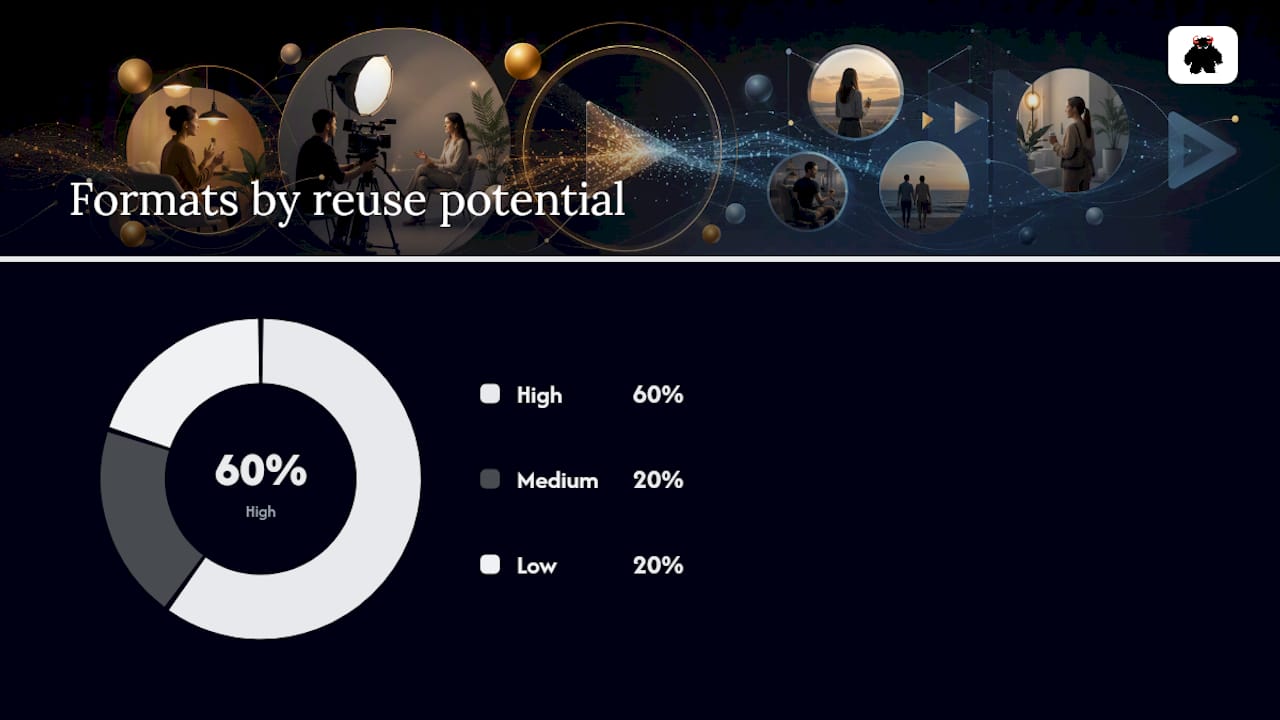
A hero customer story (60 to 120 seconds) works best on pricing and product pages, where a prospect needs the fullest possible picture before committing. A technical case study cut (2 to 4 minutes) fits sales rooms and enterprise nurture sequences, where buyers want depth on implementation and ROI. Social cutdowns (15 to 30 seconds) perform well in paid ads and LinkedIn feeds, where attention is scarce. Montage testimonials, stitching several customers together, work well on homepages to show breadth rather than depth. Audiograms, pairing waveform visuals with quoted audio, are the cheapest to produce and repurpose well in email.
| Format | Best Placement | Production Cost | Reuse Potential |
|---|---|---|---|
| Hero customer story | Pricing/product pages | Medium to high | High |
| Technical case study | Sales rooms, enterprise nurture | High | Medium |
| Social cutdown | Paid ads, LinkedIn | Low (from existing footage) | High |
| Montage testimonial | Homepage, brand pages | Medium | Low |
| Audiogram | Email, blog embeds | Low | High |
Planning Your Shoot: Subjects, Objectives, and Legal Releases
Good testimonial video production starts weeks before anyone touches a camera. The subject you choose determines whether the finished video actually moves a prospect or just sits on a landing page collecting dust.
Selecting participants:
- Match the customer’s profile to your target buyer persona, not just your biggest logo.
- Prioritize customers with a measurable result, whether that’s time saved, revenue gained, or a specific efficiency percentage.
- Screen for on-camera comfort with a short pre-call. Nervous energy on camera reads as inauthentic, even when the story is real.
- Confirm availability across your production window, including time for a follow-up shoot if needed.
Before you schedule anything, define what the video needs to accomplish. Is it meant to overcome a pricing objection? Reduce sales cycle length? Support a specific product launch? That objective shapes your interview questions later.
Legal essentials, non-negotiable before the camera rolls:
- Signed release covering usage rights (web, paid ads, sales enablement, social).
- Clarity on approval rounds. Will the customer see a rough cut before it publishes?
- Editorial control terms. Who has final say if the customer wants a line removed?
- Basic model release language if any employee or third party appears on camera incidentally.
Structure every interview around a simple story arc: context, complication, solution, result, and one emotional beat that humanizes the win. Dock’s guidance on testimonial videos points to skipped metrics and unclear releases as two of the most common reasons testimonial projects stall or underperform.
Pro Tip: Send your release form during scheduling, not on shoot day. A customer who signs under time pressure is more likely to request edits later, which delays your entire asset library.
Interview Questions That Get Customers to Drop the Script
The biggest failure in testimonial video production isn’t bad lighting. It’s a rehearsed customer reciting marketing copy back at the camera. Authentic answers come from questions that invite storytelling, not applause.
Start with a clear goal for the interview: which objection or decision trigger does this footage need to address? Then build your question set around it.
Ten high-yield interview questions:
- What was happening in your business before you started looking for a solution like ours?
- What almost stopped you from moving forward?
- What made you choose us over other options you considered?
- What did the first 30 days look like after implementation?
- What result surprised you most?
- Can you put a number on the impact, whether that’s time, cost, or revenue?
- Who else on your team noticed the difference?
- What would you tell someone on the fence about making this decision?
- What almost went wrong, and how was it handled?
- If we disappeared tomorrow, what would you miss most?
For non-professional interviewees, open with two throwaway warm-up questions unrelated to your product. It relaxes the shoulders and voice before you get to anything usable. Never coach for praise. Coach for specificity: “Can you say that again with the actual percentage?” works better than feeding them a line.
Pro Tip: If a customer gives you a vague answer like “it saved us a lot of time,” ask “compared to what, and over what period?” That single follow-up question is usually what turns a soft quote into a usable metric.
Shoot-Day Checklist: Gear, Lighting, and Remote Best Practices
Production quality doesn’t require a full crew, but it does require discipline on a short list of fundamentals. TechSmith’s production guidance makes the point plainly: even webcam footage can work when the lighting and audio are handled correctly.
Core gear checklist:
- Camera or a modern smartphone with a stabilizer or tripod.
- Lavalier or shotgun microphone; never rely on built-in camera audio.
- A basic three-point lighting setup, or at minimum a key light and a soft fill to avoid harsh shadows.
- Backup batteries and a second recording device for audio redundancy.
Frame subjects slightly off-center using the rule of thirds, with clean, brand-appropriate backgrounds free of clutter. Monitor audio levels through headphones during the shoot, not after.
Remote production best practices:
- Ship a minimal kit (mic, ring light, phone mount) ahead of the call.
- Run a technical test call 24 to 48 hours before the real shoot.
- Direct live over video call, watching framing and energy in real time.
- Ask the customer to capture 60 to 90 seconds of ambient B-roll, like their workspace or team in action, before the interview.
Pro Tip: Always request a second, wider shot alongside your main interview angle. Editors need cutaway footage to hide jump cuts, and you can’t go back and reshoot it later.
Editing Testimonial Footage Into a Story That Sells
The edit is where a decent interview becomes a persuasive asset, or where a great interview gets buried under too many words. Start by finding the hero moment, the single clearest, most quotable statement of the interview, and build the story arc around it.
Most production guides agree on runtime bands: hero videos land between 60 and 120 seconds, social cutdowns run 15 to 30 seconds, and ad snippets work best at 6 to 15 seconds, according to Dock’s testimonial production benchmarks. Trying to cram a five-minute interview into a 90-second web asset means aggressive cuts, so plan your questions with the final runtime in mind.
Editing checklist for authenticity and polish:
- Preserve natural pauses and unscripted phrasing. Over-polished cuts feel like ad copy, not a person talking.
- Add lower-thirds with the customer’s name, title, and company for credibility.
- Layer in B-roll and product screenshots to keep visual interest during longer answers.
- Skip a heavy voiceover. Let the customer’s own words carry the narrative.
- Finish every cut with a clear, purpose-driven CTA, whether that’s “Talk to sales” or “See pricing.”
- Caption every version. Most social platforms default to silent autoplay.
Where to Publish and How to Multiply One Interview’s Value
A single testimonial interview should never live in exactly one place. Treat the raw footage as raw material for an entire asset library, not a single finished product.
Primary placements that actually move prospects include pricing pages, product pages, sales rooms, email nurture sequences, paid ad campaigns, and LinkedIn organic posts. Each placement calls for a different cut length and framing, which is why the repurposing step matters as much as the shoot itself.
| Source Asset | Repurposed Into | Primary Channel |
|---|---|---|
| Hero interview (full length) | Case study page embed | Website, sales room |
| Hero interview | 30-second cutdown | Paid social, LinkedIn |
| Hero interview | Audiogram | Email nurture |
| Best quote moment | Quote card graphic | Blog, social proof sections |
| Full interview | Sales deck embed | Proposal / digital sales room |
Both Mindtickle and Dock recommend embedding testimonial video directly inside digital sales rooms rather than attaching a static file to an email. That placement lets your sales team present proof alongside pricing and proposal terms, and it gives marketing visibility into who actually watched the video and how far they got. Tag every asset with descriptive metadata and captions before publishing, since search-friendly file names and transcripts help video surface in organic search too.
Measuring What Your Testimonial Videos Actually Deliver
If you can’t measure it, you can’t defend the budget for the next round of shoots. Testimonial video production earns its place in the marketing stack only when it’s tied to KPIs someone in the room actually cares about.
Track engagement rate, play-to-completion percentage, click-through rate on any embedded CTA, and the conversion lift on pages with video versus without. Pipeline influence matters more than any vanity metric, so tag every video link with UTM parameters and connect that data to your CRM.
Test ideas worth running:
- Pricing page with hero video vs. pricing page without.
- Full hero cut vs. 30-second cutdown in the same nurture email slot.
- CTA copy variations under the same video (“Get a quote” vs. “See how it works”).
Give any test at least a full sales cycle’s worth of traffic before drawing conclusions. A two-week sample on a 45-day sales cycle will mislead you every time.
Sample Timelines and Budget Ranges by Production Approach
Choosing an approach up front sets expectations for everyone involved, from the customer being interviewed to the sales team waiting for the finished asset.
Costs scale most with travel, crew size, and revision rounds, not with camera equipment. Run one pilot interview through your chosen approach before committing to a quarterly production calendar. It’s the cheapest way to find gaps in your process before they cost you real budget.
Ready-to-Use Templates for Your First Shoot
Copy these into your production brief and adjust the language for your audience.
Shot list:
- Wide establishing shot of interviewee’s environment.
- Main interview angle, medium shot.
- Secondary angle for cutaways.
- Product or workspace B-roll (60 to 90 seconds).
- Closing shot for CTA overlay.
60-second script structure:
- 0 to 10 seconds: the problem, in the customer’s own words.
- 10 to 30 seconds: why they chose your solution.
- 30 to 50 seconds: the specific measurable result.
- 50 to 60 seconds: closing statement plus CTA overlay.
For technical audiences, weight the questions toward implementation detail and integration specifics. For executive decision-makers, weight questions toward business impact, budget justification, and time-to-value. Same template, different emphasis.
How Monstrousmediagroup Turns One Interview Into a Revenue System
Most testimonial projects fail the same way: one video gets produced, published once, and forgotten. Monstrousmediagroup builds the opposite model. Discovery mapping identifies which customer stories address your actual sales objections, story-arc planning happens before the camera rolls, and every capture session is designed to output a full asset library, not one clip.
Systems checklist for a testimonial program that compounds:
- Standardized capture kit and a remote direction playbook for consistent quality across shoots.
- Templated edit presets so cutdowns, audiograms, and quote cards come from every interview automatically.
- A release and approval workflow that keeps legal exposure low without slowing production.
- Cadence planning so new testimonials get captured quarterly, not whenever someone remembers.
Pro Tip: Build your release form and approval workflow once, then reuse it for every shoot. The teams that skip this step end up rebuilding legal paperwork from scratch each time, which quietly kills momentum.
Every release includes clear usage rights and an approval step before anything publishes, keeping the legal side simple without slowing the calendar down. This is the same story-mapping discipline reflected in work like Sparrow Logistics’ brand campaign, where visual storytelling and structured messaging built credibility across channels.
A Publisher’s Note on Treating Testimonials as Infrastructure
Testimonial videos stop paying off the moment they’re treated as a single campaign instead of a running system. The real value compounds only when a business commits to a repeatable cadence, a growing library, and a measurement habit that connects footage back to pipeline.
Most companies that abandon testimonial video production didn’t fail on camera quality. They failed on cadence, skipped measurement entirely, or never routed the finished asset to sales in a format anyone actually used.
Get Your Testimonial Videos Built as a System, Not a One-Off Project
Monstrousmediagroup is the alternative to hiring a freelance videographer for a single shoot and hoping it performs. Where a one-off production gives you a single video and no plan for what comes next, Monstrousmediagroup builds the full pipeline: professional photography and videography services, managed hosting through MonsterWP for fast playback on high-intent pages, and distribution systems that route your testimonials into the channels where they actually convert.
A single interview session becomes a working asset library under this model: a hero cut for your pricing page, cutdowns for paid social, and an audiogram for your next nurture sequence, all tracked back to pipeline through the same digital marketing systems that manage your broader campaign. Pair that with SEO services built to get your case study pages found in the first place, and one shoot day starts generating measurable pipeline influence instead of a single forgotten video file.
Schedule a pilot capture session with Monstrousmediagroup and see how one testimonial interview turns into a full quarter of sales and marketing assets.
Sources
- Customer testimonial video guidance (HubSpot)
- Testimonial videos (Dock)
- The Best Way to Make Testimonial Videos - TechSmith
- Digital sales rooms and testimonial integration (Mindtickle)
Frequently Asked Questions
What is testimonial video production?
Testimonial video production is the process of planning, filming, and editing interviews with real customers into short marketing assets that show a specific problem, solution, and measurable result.
How much does a professional testimonial video cost?
Costs typically range from $500 to $2,500 for DIY or remote-directed shoots, $2,500 to $7,500 for hybrid production, and $7,500 to $25,000 or more for full-service crews with multiple locations.
How long should a testimonial video be?
Hero testimonials for websites and sales rooms typically run 60 to 120 seconds, while social cutdowns work best at 15 to 30 seconds and paid ad snippets at 6 to 15 seconds.
How do you get customers to sound authentic on camera?
Avoid scripted praise. Ask open-ended questions, use warm-up questions to relax the interviewee, and follow up on vague answers to get specific, quotable metrics.
What legal releases do you need before filming a customer testimonial?
You need a signed release covering usage rights across web, ads, and sales enablement, clarity on approval rounds, editorial control terms, and a basic model release if other people appear on camera.
Can you produce a testimonial video remotely?
Yes. Remote production works well when you ship a minimal gear kit, run a technical test call in advance, and direct the interview live over video while asking for supplemental B-roll footage.
Where should testimonial videos be published for the best results?
Pricing pages, product pages, digital sales rooms, email nurture sequences, and paid social ads all perform well, with each channel calling for a different cut length and framing.
What KPIs should you track for testimonial video performance?
Track engagement rate, play-to-completion percentage, CTA click-through rate, conversion lift on pages with video, and downstream pipeline influence through UTM-tagged links.
How do you choose the right customer for a testimonial video?
Select customers who match your target buyer persona, have a measurable result to share, are comfortable on camera, and are available across your full production timeline.
How does Monstrousmediagroup approach testimonial video production differently?
Monstrousmediagroup treats testimonial production as a repeatable system rather than a single project, turning one interview into a full asset library with hosting, distribution, and measurement built in through managed marketing and web infrastructure.