
Offline conversion tracking links real-world sales back to the clicks that caused them so ad platforms can optimize for revenue, not just web events. When someone clicks your ad, requests a quote by phone, and closes six weeks later in your CRM, that revenue is invisible to Google Ads unless you send it back. Once you do, Smart Bidding stops chasing form-fills and starts chasing dollars.
Google’s recommended path in 2026 is enhanced conversions for leads, run through Data Manager, which pairs the click identifier with hashed contact data for stronger matching. This isn’t a reporting nicety. It’s the difference between an algorithm that optimizes for cheap leads and one that optimizes for the leads that actually pay.
- Connects offline sales, phone orders, and CRM-closed deals to the original ad click
- Feeds Smart Bidding real revenue signals instead of proxy metrics like form submissions
- Runs primarily through Google Ads Data Manager and enhanced conversions for leads
Key Takeaways
Offline conversion tracking works because it feeds ad platforms real revenue data through GCLID and hashed identifiers, letting Smart Bidding optimize for closed deals instead of surface-level leads.
| Point | Details |
|---|---|
| Capture identifiers at the source | Store GCLID and hashed email or phone at the moment of lead submission, not after. |
| Respect the timing windows | Expect visibility in about 3 hours, full processing in 24 to 48 hours, and a 90-day import limit. |
| Use Data Manager going forward | Legacy API uploads are being phased out in favor of Data Manager for offline conversion imports. |
| Watch match rate weekly | Treat CLICK_NOT_FOUND spikes as a systemic signal, not a one-off error to ignore. |
| Scale with server-side pipelines | Monstrousmediagroup builds capture-to-verify infrastructure once manual uploads outgrow their usefulness. |
Table of Contents
- What Counts as an Offline Conversion?
- How Does Offline Conversion Matching Actually Work?
- How Do You Set Up Offline Conversion Tracking in Google Ads?
- Why Are Your Offline Conversions Not Showing Up?
- Which Implementation Method Fits Your Business?
- How MMG Builds Offline Conversion Tracking as Infrastructure
- The Gap Between Compliant Setup and Actually Working Setup
- Turn Offline Conversion Data Into a Working Revenue System
- Sources
What Counts as an Offline Conversion?
An offline conversion is any revenue event that happens outside your website after someone clicks an ad. Your ad platform never sees these unless you tell it, because the pixel that fires on your site has no visibility into what happens in a call center, a showroom, or a sales rep’s CRM update three weeks later.
Common examples include:
- In-store purchases following a “get directions” or local inventory ad click
- Phone orders taken by a sales team, with no online checkout step
- CRM-marked “closed-won” deals that started as a lead form submission
- Bookings or appointments confirmed through a scheduling system, not the website itself
Platforms miss these events for structural reasons: pixels can’t track cross-device journeys, phone calls don’t carry tracking parameters, and offline channels (retail, field sales, call centers) sit entirely outside the browser session. Offline conversion tracking matters most when your sales cycle is long, your average order value is high, or your buyer touches multiple channels before paying, because those are exactly the scenarios where last-click, on-site data lies to you the most.
How Does Offline Conversion Matching Actually Work?
Matching offline events back to ad clicks relies on identifiers you capture at the moment of the click and carry through your sales process until the deal closes. Two mechanisms do the heavy lifting.
- GCLID capture and return. When someone clicks a Google ad, a Google Click ID gets appended to your landing page URL. You capture it (typically via a hidden form field or a Google Tag Manager snippet), store it against the lead record in your CRM, and return it to Google Ads once the deal closes.
- Enhanced conversions for leads. This layers hashed first-party data, usually email and phone number, on top of (or instead of) the GCLID. Google requires SHA-256 hashing with specific normalization rules: lowercase the email, strip whitespace, format phone numbers in E.164. Get the normalization wrong and the hash won’t match, even if the underlying data is correct.
- Multiple identifiers, higher match rates. Sending both GCLID and hashed contact data gives Google more paths to a match, which matters when a lead switches devices between clicking the ad and eventually buying.
About offline conversion imports confirms that returning either identifier lets platforms optimize bidding on actual revenue rather than surface-level lead volume. That’s the entire value proposition in one sentence: you stop paying for clicks that look good on a dashboard and start paying for clicks that generate money.
One operational wrinkle worth flagging up front: if you upload both GCLID and hashed data for the same conversion and Google prioritizes one over the other, you can get matching conflicts. Enhanced conversions for leads guidance recommends testing an upload with only the hashed data to isolate which identifier is causing the mismatch.
Privacy handling isn’t optional here. Hashed uploads protect raw personal data in transit, and any consent status collected at the original session needs to travel with the identifier all the way to the point of upload, not get dropped somewhere in the CRM pipeline.
How Do You Set Up Offline Conversion Tracking in Google Ads?
Setup follows a predictable sequence, and skipping a step is the single biggest reason match rates come in low.
- Create the conversion action in Google Ads and set the correct counting behavior (biddable vs. observation) before any data flows, since this determines whether the conversion actually influences bidding.
- Enable auto-tagging in your account settings. Without it, GCLIDs won’t append to your URLs at all.
- Capture the GCLID at lead submission. Google’s GCLID setup guide recommends a hidden form field or a tag manager snippet that grabs the parameter from the URL and writes it into the CRM alongside the lead record.
- Persist the identifier through your sales cycle. The GCLID needs to survive from lead creation to deal closure, which for B2B sales cycles can mean weeks or months in the CRM untouched.
- Choose your import method. Data Manager (Google’s current recommended path) handles this at the API level; scheduled CSV uploads work for lower-volume pilots; CRM native connectors automate the CRM-to-Ads handoff; server-side webhooks suit higher-volume, real-time needs.
- Hash and format correctly. SHA-256 with the normalization rules noted above. Google does accept unhashed one-off uploads in some contexts, but hashed data is the standard for anything recurring.
- Respect the timing windows. Wait roughly 4 to 6 hours after creating a new conversion action before your first upload, expect initial visibility in reporting around 3 hours after a successful upload, and allow 24 to 48 hours for full processing.
Pro Tip: Build the GCLID capture field into your lead form before you launch the campaign, not after. Retrofitting capture onto a form that’s already collecting leads means every lead before that fix is permanently unmatched and unrecoverable.
Developers building this at the API level should note that Data Manager API is now the required path for offline conversion uploads, with legacy upload methods phased out for developer tokens without recent activity. If your team still has code pointed at the older upload endpoint, that migration needs to happen before it breaks silently.
Why Are Your Offline Conversions Not Showing Up?
Most tracking failures show up in two places: the Uploads tab and the Diagnostics tab inside your conversion action settings. Learning to read them correctly saves hours of guessing.
- CLICK_NOT_FOUND is the most common error and usually means the GCLID wasn’t captured correctly, the click fell outside the 90-day import window, or there’s a tagging mismatch between the account that served the ad and the account uploading the conversion.
- Treat CLICK_NOT_FOUND as a warning if it’s occasional, but treat it as a systemic problem if it’s hitting a large share of uploads. That pattern usually points to a broken capture field, not a one-off fluke.
- Duplicate conversions get created when your counting setting is misconfigured. Check whether the conversion action is set to count “every” conversion or “one” per click, since the wrong setting inflates or deflates reported volume.
- CRM speed-to-entry matters more than most teams realize. If your sales team enters closed deals slowly, and that delay pushes the upload past the 90-day import window, the conversion is permanently unrecoverable. Long sales cycles are exactly where this risk concentrates.
Pro Tip: If conflicts appear between GCLID and hashed data matches, Google’s own troubleshooting guidance suggests re-uploading with only the hashed identifier to isolate the cause before you assume the whole pipeline is broken.
Which Implementation Method Fits Your Business?
The right architecture depends on volume, engineering capacity, and how fast you need data to move, not on which method sounds most advanced.
- Manual CSV upload works for a proof-of-concept. It’s fast to try and requires no engineering, but it’s high-latency and error-prone at any real volume, and someone has to remember to do it.
- CRM native connectors cut engineering cost and add moderate automation, but you inherit maintenance risk every time your CRM vendor changes its API or field structure.
- Middleware automation platforms are cheaper than custom engineering, but they get brittle at scale and usually require separate workflows for every ad platform you connect.
- Server-side/webhook pipelines are the recommended approach once volume justifies the build. Practitioner guidance on server-side tracking points to real-time delivery, centralized deduplication, and consistent consent handling as the core advantages over the alternatives above.
Before choosing, run through a short checklist: What’s your monthly conversion volume? How much latency can you tolerate between a closed deal and an upload? Does your team have engineering bandwidth to maintain a server-side pipeline? And how are you handling consent signals across every method you’re considering? The answers usually make the decision for you.
How MMG Builds Offline Conversion Tracking as Infrastructure
Most teams treat offline conversion tracking as a one-time setup task. Monstrousmediagroup treats it as infrastructure that needs monitoring the same way you’d monitor server uptime, because a broken match rate quietly bleeds ad spend every single day it goes unnoticed.
The pipeline runs on four stages: capture the identifier at the point of lead entry, normalize it into Google’s required hash format, transport it through a server-side channel rather than a manual upload, and verify match rates against a daily reconciliation job.
A minimum viable version of this looks like:
- GCLID plus hashed email captured at the same form submission, never as an afterthought
- Server-side ingestion with a deduplication key so no deal counts twice
- A daily reconciliation check comparing CRM closed-won records against what actually landed in Google Ads
Monitor match rate as an operational metric, not a one-time report, with data ops and marketing sharing ownership of the number.
The Gap Between Compliant Setup and Actually Working Setup
Most guidance on offline conversion tracking stops at “here’s how to upload a CSV,” and that’s exactly why so many accounts have technically correct configurations that quietly stop working within a quarter. A GCLID capture field breaks when a developer redesigns the lead form. A CRM field mapping shifts during a system migration. Nobody notices because the uploads still “succeed,” they just stop matching.
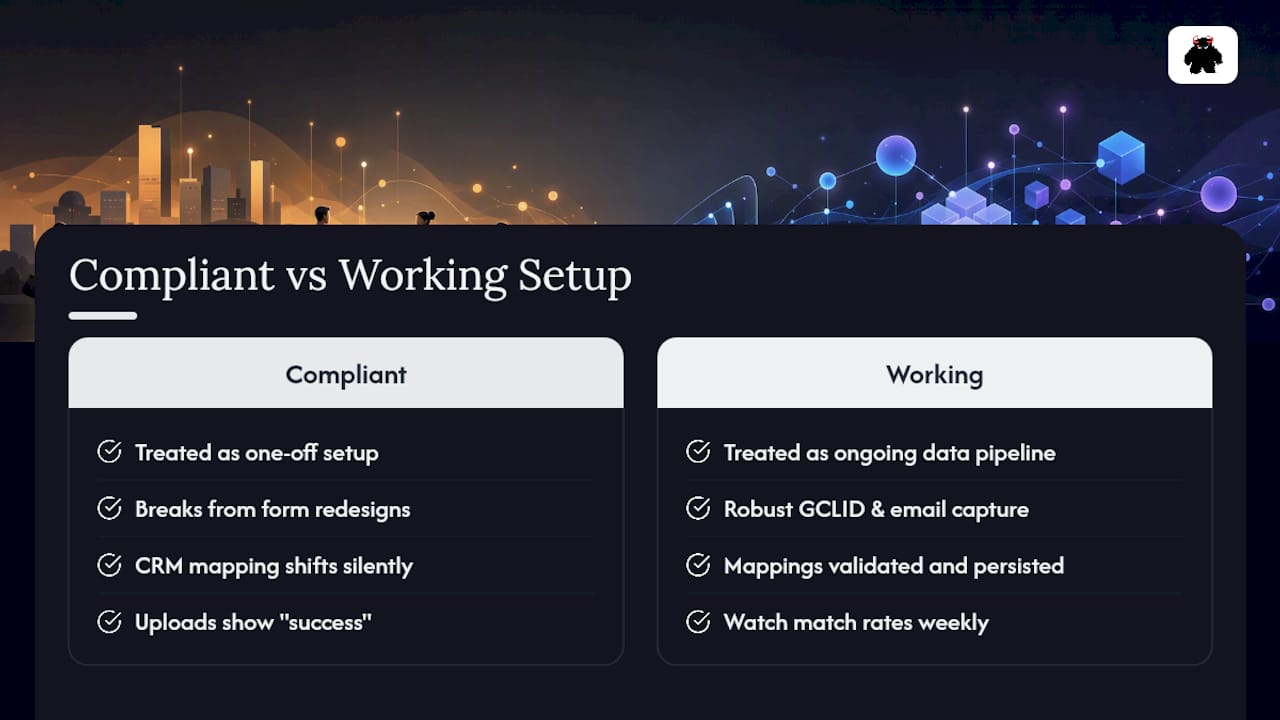
The conventional advice treats this as a setup project with a finish line. It isn’t. It’s a data pipeline, and pipelines fail silently unless something is watching them. The businesses getting real value from this aren’t the ones with the most sophisticated hashing logic. They’re the ones checking match rates weekly and treating a sudden drop the same way they’d treat a server outage.
If you’re implementing this for the first time, prioritize the boring part first: reliable GCLID and email capture at the point of lead entry, persisted correctly through your CRM. The hashing rules and the API migration deadlines matter, but they’re solvable engineering problems. A capture field that silently breaks is the failure mode that actually costs money, month after month, without anyone noticing until someone finally asks why Smart Bidding performance quietly declined.
- Vector
Turn Offline Conversion Data Into a Working Revenue System
There’s a real gap between reading a setup guide and running a pipeline that survives CRM migrations, form redesigns, and API deprecations without anyone noticing it broke. Monstrousmediagroup builds the offline conversion infrastructure most teams try to patch together internally: capture, normalization, server-side transport, and a reconciliation check that catches match-rate drops before they cost you a quarter of wasted ad spend.

Our team audits your current GCLID and CRM setup, builds the minimum viable server-side pipeline, and then scales it against real match-rate benchmarks tied to your paid search management and marketing automation infrastructure. If your lead capture process still drops identifiers on the floor before they ever reach the CRM, our lead capture automation work closes that gap first. Request a pipeline review through our paid search advertising services page and get a straight answer on where your current match rate is leaking revenue.
Sources
- About offline conversion imports - Google Ads Help
- Offline Conversion Tracking: What It Is & How to Get Started
Recommended
- Data-driven Advertising Approaches: Turning Visibility Into Revenue | Monstrous Media Group
- Conversion Rate Optimization Services: Where Most Websites Leak Money | Monstrous Media Group
- Data-driven Marketing Agencies: How Revenue Systems Beat Activity | Monstrous Media Group
- Revenue-driven Marketing Solutions That Turn Visibility Into Measurable Growth | Monstrous Media Group