
CRM marketing integration connects your customer relationship management system directly with your marketing tools so lead data, campaign activity, and sales stages flow automatically in both directions. The immediate payoff is speed and accountability: faster lead response, fewer leads lost between handoffs, and the ability to trace revenue back to the campaign that started it. Done right, it turns MQLs into SALs without a spreadsheet in sight, and it gives clients a real answer when finance asks what marketing actually produced.
TL;DR:
- Integrated CRM marketing systems enable real-time lead scoring, instantaneous routing, and dynamic segmentation, significantly reducing lead response times and optimizing sales follow-up.
- Choosing between native connectors, iPaaS, or custom APIs depends on the number of systems, data volume growth, and compliance needs, with native integrations being quickest to deploy.
- A successful implementation requires thorough discovery, careful field mapping, clear workflow definitions, and phased testing, emphasizing ongoing monitoring over one-time setup.
- Key KPIs like lead response time, MQL to SQL conversion, pipeline velocity, and revenue attribution should be tracked to assess the impact of CRM integration on sales results.
- Proper data hygiene, consent management, and governance are critical for compliance, requiring centralized control and regular maintenance to prevent technical debt and data breaches.
MonstrousmediagroupTurn Marketing Data Into RevenueMonstrous Media Group builds integrated marketing systems that help businesses generate, capture, and close more revenue without added chaos.Explore Monstrous Media Group
Table of Contents
- What Is CRM Marketing Integration and Why Does It Matter?
- How Does CRM Integration Improve Marketing Workflows and Lead Management?
- Native Connectors, iPaaS, or Custom APIs: Which Fits Your Stack?
- Implementation Roadmap: From Discovery to Rollout
- What KPIs Prove CRM Integration Is Working?
- Data Hygiene, Governance, and Identity Management
- Common Pitfalls and Technical-Debt Traps
- MMG’s Operational View: Integration as Revenue Infrastructure
- Security and Privacy Compliance in CRM Marketing Integration
- Real-World Patterns: What Successful Integrations Look Like
- The Real Gap in Most CRM Integration Projects
- How MMG Turns Your Stack Into a Revenue System
- Sources
- FAQ
What Is CRM Marketing Integration and Why Does It Matter?
CRM marketing integration is the practice of syncing your CRM (the system of record for contacts, deals, and accounts) with the tools that generate and nurture leads: email platforms, marketing automation software, ad platforms, and analytics dashboards. The goal is a single source of truth, one record per contact that both marketing and sales trust, instead of five half-updated versions scattered across tools.
That matters because disconnected systems create blind spots. Sales doesn’t know a lead just opened three pricing emails. Marketing doesn’t know a “hot” lead has been sitting untouched in a rep’s queue for six days. Integrated systems automate the handoff between marketing and sales and give sales full context on a lead before the first call, which shortens sales cycles instead of just making dashboards prettier.
Most CRM integrations connect to a predictable set of systems:
- Marketing automation and email platforms - sync engagement data (opens, clicks, form fills) directly into contact records so sales sees behavior, not just contact info.
- Analytics tools - feed website and campaign performance data back into the CRM for attribution.
- Ecommerce platforms - connect purchase history to marketing segments for upsell and win-back campaigns.
- Helpdesk and support software - surface support tickets in the CRM so sales doesn’t pitch an upgrade to an angry customer.
- Billing and ERP systems - tie invoicing and contract data to the same record, closing the loop from lead to renewal.
Some of these connections run in real time (a form submission that instantly creates a CRM record and triggers an alert), while others run on scheduled batch syncs (nightly billing updates, weekly analytics pulls). Real-time sync matters most where speed changes outcomes, like lead routing. Batch sync is fine for reporting data nobody needs to the minute.
How Does CRM Integration Improve Marketing Workflows and Lead Management?
Integration doesn’t just move data. It changes how marketing and sales actually operate together, and the shift shows up in three places.
- Lead scoring, routing, and SLAs get sharper. When CRM and marketing automation share data live, a lead’s score updates the moment they visit a pricing page, and routing rules fire instantly, sending the lead to the right rep with an SLA clock already running. No integration means scoring happens on a delay, and by the time a rep sees the lead, the window has closed.
- Personalization becomes dynamic instead of static. Segments update automatically as CRM data changes. A prospect who moves from “trial” to “closed lost” gets pulled out of the nurture stream and into a win-back sequence without anyone touching a list manually.
- Attribution closes the loop. Instead of guessing which campaign drove a deal, integrated systems tie the original touchpoint, the nurture sequence, and the closed deal into one record. That’s how you tell your CFO which channel actually produced revenue, not just clicks.
The pattern behind all three: integration replaces manual judgment calls with rules that fire the same way every time. That consistency is the entire reason “automated CRM marketing” outperforms manual coordination between departments that technically talk to each other but rarely look at the same data.
Native Connectors, iPaaS, or Custom APIs: Which Fits Your Stack?
The integration approach you pick depends less on preference and more on how many systems you’re connecting and how much change your stack sees in a given year.
- Native connectors are the fastest path when your CRM and marketing tool both offer a built-in integration. Setup takes hours, not weeks, but you’re limited to whatever fields and triggers the vendor decided to support.
- iPaaS (integration platform as a service) sits between multiple systems and handles mapping, transformation, and governance across a stack. iPaaS and pre-built connectors accelerate time-to-value and support governance across multi-app environments, which makes this the right call once you’re connecting more than two or three systems.
- Custom APIs give you full control for edge cases native tools don’t cover, but every custom build is a maintenance obligation you now own indefinitely.
Pro Tip: Before building anything custom, check whether your CRM vendor already ships a native connector for the tool you need. Teams skip this step constantly and end up maintaining code for a problem the vendor already solved.
Run this checklist before committing to an approach:
- How many systems actually need to talk to each other today?
- What’s your realistic data volume, and will it grow 10x in two years?
- Do you have compliance requirements (HIPAA, GDPR-style consent tracking) that demand audit trails middleware can’t easily provide?
- How often does your stack change? High-turnover stacks favor iPaaS flexibility over rigid custom code.
Implementation Roadmap: From Discovery to Rollout
A CRM marketing integration project fails most often because someone skipped discovery and jumped straight to building. Here’s the sequence that actually holds up.
- Discovery. Inventory every system that touches customer data, marketing automation, helpdesk, ecommerce, billing. Build a canonical field list (one definitive version of “lead source,” “company size,” “lifecycle stage”) and flag any privacy constraints tied to specific data types before you map a single field.
- Mapping and enrichment. Define field-level mappings between systems and set dedupe rules for what happens when the same email address shows up from two sources. Decide your identity resolution logic now: is email the master key, or do you need a combination of email plus domain plus phone to avoid merging two different people at the same company.
- Workflows and SLAs. Define every lead stage (new, MQL, SAL, SQL, opportunity) and the exact handoff rule between each one. Write test cases before you build anything: “If a lead scores above 80 and hasn’t been contacted in 24 hours, escalate to manager” is a testable rule, not a hope.
- Testing and rollout. Run the integration in a sandbox first. Reconcile record counts between systems before and after each sync to catch silent data loss. Deploy in phases (one segment, one region, one product line) rather than flipping the switch for the entire database at once, and train both marketing and sales on the new workflow before it goes live everywhere.
Skipping the sandbox step is the single most common reason integrations break in production and nobody notices for three weeks. Test with real (anonymized) data volume, not ten sample records, because sync issues at scale rarely show up in a small test batch.
What KPIs Prove CRM Integration Is Working?
Track lead response time, MQL to SQL conversion rate, pipeline velocity, and marketing sourced revenue. These four numbers tell you whether the integration is actually changing outcomes or just moving data around for no measurable reason.
- Lead response time - how fast a rep engages after a lead crosses a scoring threshold. Integration should cut this from hours to minutes.
- MQL to SQL conversion rate - a rising rate signals better lead quality reaching sales, not just more volume.
- Pipeline velocity - how quickly deals move stage to stage once marketing and sales share the same data.
- Marketing sourced and influenced revenue - the number that ends the “what does marketing actually produce” argument.
On attribution, last touch is simpler to build but overcredits the final campaign before close. Multi touch models spread credit across every interaction and give a more honest picture, at the cost of more setup work.
For a basic ROI model: estimate your current lead leakage (leads that go untouched past your SLA window), multiply by average deal value and close rate, and compare that number against integration cost. Non-integrated systems carry a hidden productivity tax from context switching and manual reconciliation, and consolidating into a properly integrated platform often pays back within 6 to 12 months.
Data Hygiene, Governance, and Identity Management
None of this works without clean data underneath it. Set a canonical identifier for every contact (usually email plus a CRM record ID) and run scheduled deduplication so the same person doesn’t exist as four records with slightly different spellings of their company name. Standardize your enum fields too. If “lead source” reads “Web,” “Website,” and “web form” in three different tools, your reporting is lying to you.
- Assign consent status and suppression rules at the record level so a legal opt-out in one system suppresses outreach everywhere.
- Centralizing suppression and bounce handling in the CRM protects sender reputation and keeps deliverability risk contained instead of scattered across five email tools.
- Give one person (a data steward, even part time) ownership of field standards and cleanup cadence, because “everyone owns it” means no one does.
Common Pitfalls and Technical-Debt Traps
Middleware that solved a problem in month one can quietly become the thing blocking your roadmap by month eighteen. Relying indefinitely on connector tools as permanent glue between systems creates technical debt that limits scalability, especially once you’re stacking five or six point-to-point connections that nobody fully documented.
Brittle field mappings are the other repeat offender. A vendor changes an API field name, nobody notices for two weeks, and suddenly half your leads are missing a lifecycle stage. Unclear ownership makes this worse: if no one is accountable for the integration once it’s live, failures sit unnoticed until a sales leader asks why pipeline looks thin.
Pro Tip: Build monitoring and alerting into the integration from day one, not as a fix after the first outage. A simple daily record-count reconciliation between systems catches silent sync failures before they cost you a quarter’s worth of leads.
MMG’s Operational View: Integration as Revenue Infrastructure
CRM marketing integration should be treated the same way as any revenue system: as infrastructure that needs monitoring, not a project that ends at launch. That means lead capture automation, follow-up sequencing, and CRM sync work together as one system with clear ownership, not three separate vendor relationships hoping to align.
Integration should be an operational evolution, not a one-time connectivity project. Organizations that move beyond simply linking systems toward genuine behavioral alignment, where every team acts on the same customer intent signal at the same time, get the durable advantage. Everything short of that is just data movement with extra steps.
That approach involves monitoring that catches sync failures before they cost a quarter of pipeline, lead protection that closes the follow-up gap, and automation that gives sales the same context marketing already has.
Security and Privacy Compliance in CRM Marketing Integration
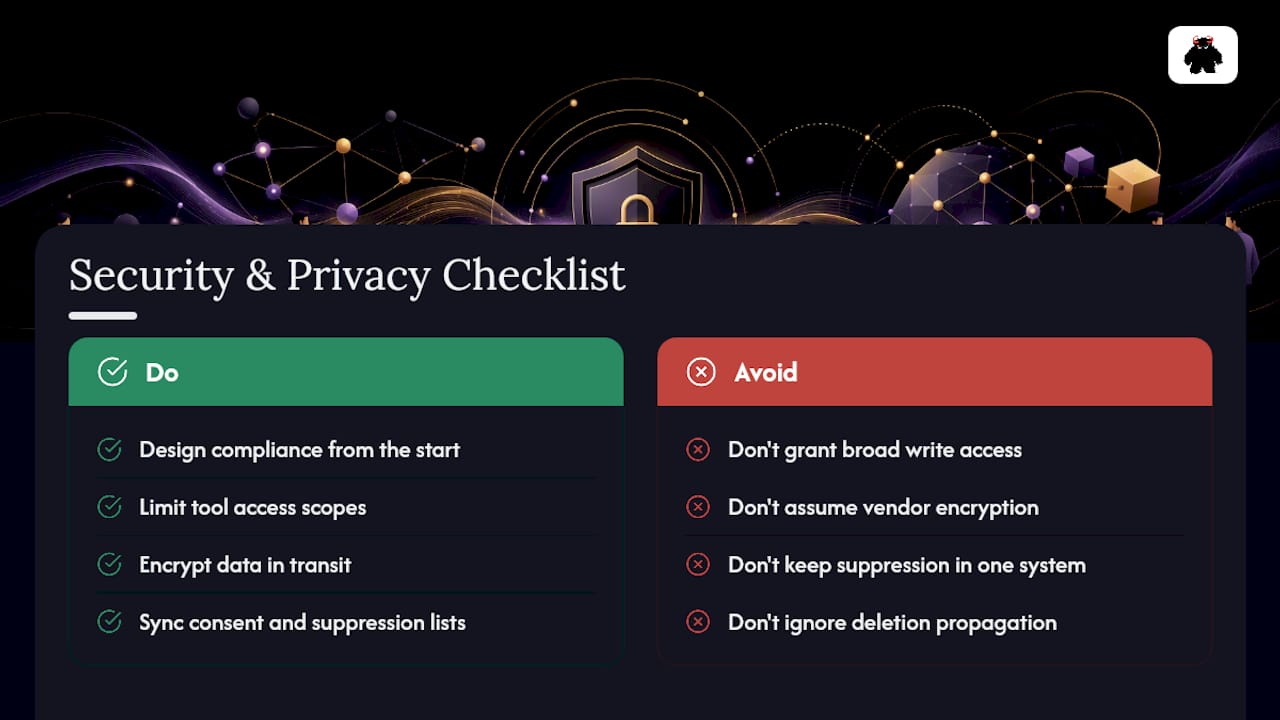
Every integration point is also a data exposure point, and CRM marketing integration typically involves personal data covered by regulations like the CAN-SPAM Act, state-level privacy laws, and, for companies with European contacts, GDPR. Treat compliance as a design requirement from the start, not a legal review you run after the integration ships.
Start with access control. Not every marketing tool needs write access to every CRM field, and limiting scopes reduces both risk and the blast radius if a connector gets compromised. Encrypt data in transit between systems, and confirm your vendors support that by default rather than assuming it.
Consent management needs to live in the integration logic itself, not just in a policy document. If a contact withdraws consent in your email platform, that status needs to sync to the CRM immediately, and to every downstream tool that touches outreach. A suppression list that only exists in one system is a compliance gap waiting to surface during an audit.
Data retention matters just as much. Define how long you keep inactive or unconverted lead records across every connected system, and make sure deletion requests propagate everywhere the data lives, not just in the system where the request came in. Document your data flows (what moves where, on what schedule, under what access) so you have an answer ready when a customer or regulator asks where their information went.
Real-World Patterns: What Successful Integrations Look Like
The integrations that hold up over time share a common pattern regardless of industry: they fix a named, quantifiable problem instead of chasing a vague goal of “better alignment.”
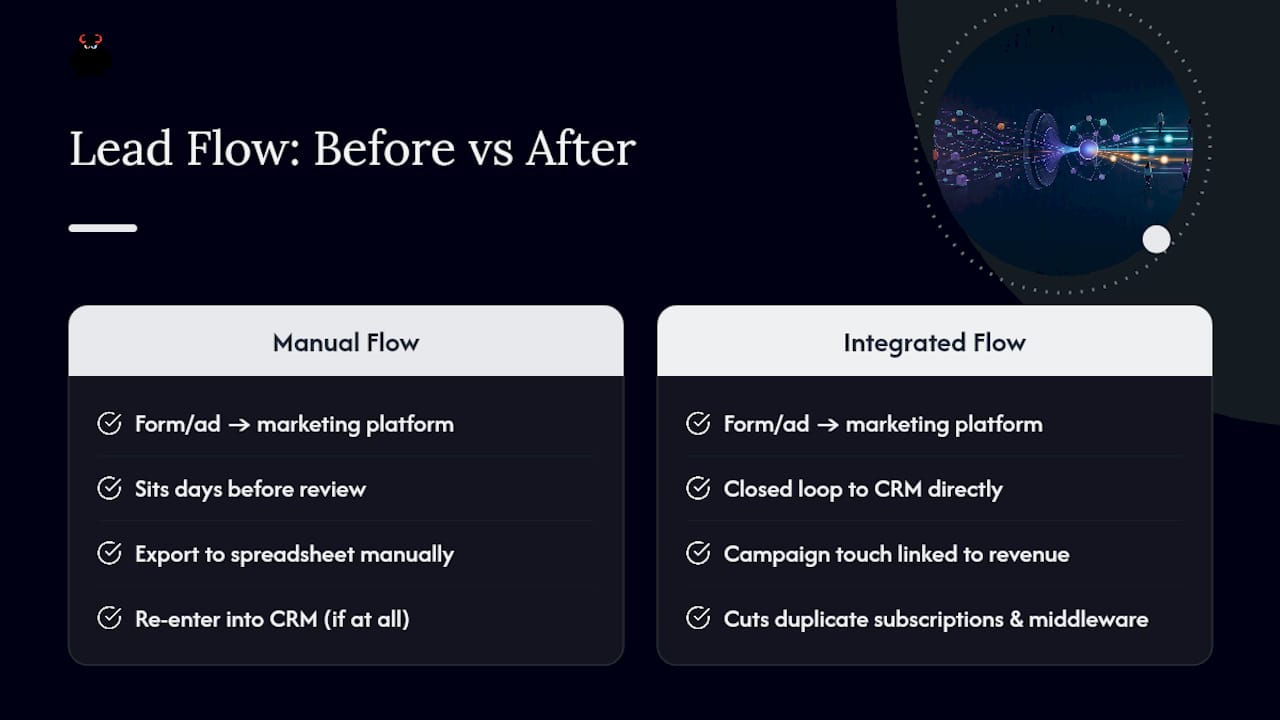
A common failure pattern before integration looks like this: leads from a form or ad campaign land in a marketing platform, sit for days before anyone reviews them, then get manually exported to a spreadsheet and re-entered into the CRM, if anyone remembers to do it at all. Every manual step is a place a lead can die quietly. Integrated CRM and email marketing platforms close that loop directly, connecting campaign touch to revenue and cutting the duplicate-subscription and middleware costs that come from running disconnected tools side by side.
The businesses that get this right tend to start narrow. They fix the highest-value leak first, usually the gap between form submission and first sales contact, prove the SLA improvement with real numbers, then expand the integration to cover nurture sequences, attribution reporting, and renewal triggers. Businesses that try to integrate everything on day one tend to stall in mapping meetings for months. The ones that fix one leak, measure it, and expand from there are the ones still running the same integration two years later without a rebuild.
The Real Gap in Most CRM Integration Projects
Most companies treat CRM marketing integration as a technical checkbox: connect the tools, map some fields, call it done. That framing misses the actual failure point. Systems rarely break because two platforms couldn’t talk to each other. They break because no one owns the relationship between them after launch, so a broken sync sits unnoticed until someone asks why the pipeline number looks wrong. I’ve seen the smallest gap, a lead sitting untouched for four days because a routing rule silently failed, cost more in lost revenue than the entire integration budget. Treat the sync itself as a system that needs a heartbeat check, not a project with an end date.
- Vector
How MMG Turns Your Stack Into a Revenue System
Monstrous Media Group builds the operational layer between your marketing tools and your CRM so leads stop dying in handoff gaps and every campaign dollar can be traced to a closed deal. That’s the concrete difference: most agencies hand you a report; MMG builds the marketing automation infrastructure that fixes the leak itself, from lead capture and CRM follow-up sequencing to the data governance that keeps your records clean six months after launch.

Engagements typically start with an audit of where leads are currently getting lost, whether that’s a routing delay, a scoring gap, or a follow-up sequence that never fires, then move into building the integration, workflows, and monitoring around that specific leak. If you’ve already read our piece on stopping leads from dying in the follow-up gap, you already know the pattern MMG builds against.
If your CRM and marketing tools are technically connected but nobody trusts the data coming out of them, start with a conversation about your Audience Intent Marketing services and get a scoped plan for fixing it.
Sources
FAQ
What Does a CRM Do for Marketing?
A CRM gives marketing teams a live record of every contact’s activity, deal stage, and history, so campaigns can target based on real behavior instead of guesswork. When integrated with marketing automation, it also enables lead scoring, dynamic segmentation, and closed-loop attribution back to revenue.
What Are the Top CRM Tools Businesses Use for Marketing Integration?
Most businesses build around a CRM paired with a marketing automation or email platform, connected either natively or through an iPaaS layer. The right combination depends on your data volume, compliance needs, and how many other systems (ecommerce, helpdesk, billing) need to plug in.
What Are the Four Types of CRM?
The four common categories are operational (managing day-to-day sales and marketing processes), analytical (mining customer data for insights), collaborative (sharing customer data across departments), and strategic (building long-term customer relationship plans). Most CRM marketing integration work touches operational and analytical CRM functions directly since those drive lead routing and attribution.
What Are Some Examples of CRM Marketing in Action?
Examples include automated lead scoring that routes hot leads to sales within minutes, dynamic email segments that update as a contact’s CRM stage changes, and closed-loop reporting that ties a closed deal back to its original campaign source. Each depends on the CRM and marketing platform sharing live data rather than operating in separate silos.
How Long Does a CRM Marketing Integration Project Typically Take?
Native connector setups can take days to a few weeks, while iPaaS or custom API projects covering multiple systems often run one to three months depending on data complexity and compliance requirements. Discovery and field mapping usually take longer than the actual technical build.
What’s the Difference Between Native Integrations and iPaaS?
Native integrations are pre-built connections offered directly by a vendor, fast to set up but limited to supported fields and triggers. iPaaS platforms sit between multiple systems and handle mapping and governance across a broader stack, making them the better fit once you’re connecting more than two or three tools.
How Do You Measure ROI on CRM Marketing Integration?
Compare your current lead leakage (untouched leads past SLA) multiplied by average deal value against your integration cost, then track lead response time, MQL to SQL conversion, and marketing sourced revenue after launch. Consolidating disconnected systems often pays back within 6 to 12 months once you account for time lost to manual reconciliation.
What Causes Most CRM Integration Projects to Fail?
Skipping discovery and sandbox testing is the most common cause, followed by relying on ad hoc middleware connections with no monitoring or clear ownership. Middleware that isn’t maintained as a long-term system tends to accumulate technical debt that eventually blocks scale.
Does CRM Marketing Integration Help With Data Privacy Compliance?
Yes, when built correctly. Centralizing consent status, suppression lists, and access controls in one connected system makes it easier to honor opt-outs and data deletion requests everywhere, rather than chasing scattered records across disconnected tools.
Can Monstrous Media Group Help With CRM Marketing Integration?
Yes. MMG builds marketing automation and lead capture and CRM follow-up systems designed specifically to close follow-up gaps and connect campaign data to revenue outcomes. Pricing is scoped per engagement and available on request through the services page.