Prioritize product demos, testimonials, and short explainers over polished brand films, keep each one under two minutes, and put your distribution budget behind LinkedIn and CRM-triggered email before anything else.
- Formats that convert: product demos, customer testimonials, and 60 to 90 second explainers outperform long-form brand videos for B2B buyers.
- Runtimes by stage: awareness clips run 15 to 30 seconds, consideration content runs 60 to 90 seconds, decision-stage demos can run 3 to 5 minutes.
- Distribution priority: LinkedIn first, then email/CRM sequences, then landing pages. HubSpot found LinkedIn now edges out YouTube among B2B teams, with roughly 80% using it for video sharing. Monstrous Media Group treats this as the default channel order for any client running video as part of a revenue system.
Key Takeaways
B2B product videos generate pipeline when they’re matched to funnel stage, captioned for sound-off viewing, tagged by deal stage, and distributed through LinkedIn and CRM sequences rather than treated as one-off campaign assets.
| Point | Details |
|---|---|
| Match format to funnel stage | Use demos for decision-stage buyers, explainers for consideration, and short cuts for awareness. |
| Design for sound-off viewing | Burn in captions since roughly 79% of LinkedIn audiences scroll without sound, per Search Engine Land. |
| Prioritize LinkedIn distribution | HubSpot found about 80% of B2B teams now use LinkedIn over YouTube for video sharing. |
| Build a searchable, tagged library | Organize assets by persona and deal stage so sales can pull the right clip instantly. |
| Treat video as infrastructure | Monstrous Media Group connects video assets to CRM and email automation so the right clip fires at the right deal stage. |
Table of Contents
- 10 B2B Product Video Examples Worth Copying
- Which B2B Video Format Fits Which Funnel Stage?
- How to Produce B2B Product Videos Without a Full In-House Studio
- Where Should You Post B2B Product Videos and What Should You Track?
- Build a Reusable Brief and Production Checklist
- Getting Your Product Videos Found in Search
- Which Tools Should Handle Your Video Creation and Editing?
- Making B2B Product Videos Work for Every Viewer
- How Monstrous Media Group Turns Video Into Revenue Infrastructure
- Frequently Asked Questions
- Sources
10 B2B Product Video Examples Worth Copying
Great B2B product videos don’t win because they’re expensive. They win because they answer one buyer question fast and get out of the way. Here are ten worth studying, with a tactical note on what to lift for your own program.
Dropbox built its early growth on a simple, almost cartoonish explainer that showed the exact pain of emailing files back and forth before showing the fix. The takeaway: don’t animate your product, animate the problem first, then cut to the solution in under 20 seconds.
Adobe uses cinematic, benefit-led storytelling for tools like Creative Cloud, leaning on real creator outcomes instead of feature lists. Marketing owns this asset type. Place it at the top of funnel on YouTube and paid social, and watch view-through rate rather than clicks.
Slack built a library of short, funny workplace-scenario videos that dramatize friction (endless email chains, missed updates) before Slack resolves it in seconds. The tactical lift: cast real internal pain points as the villain, not competitors.
HubSpot favors modular explainer content that breaks a complex platform into single-feature clips instead of one long overview, according to Wistia’s roundup of B2B product video examples. That’s a production efficiency move as much as a creative one. Sales owns these clips and drops them into deal-stage follow-ups.
Loom essentially turned personalized screen-recorded video into its own outreach category. Atlassian’s Loom team recommends mapping short async demos directly to funnel stage, then embedding a CTA inside the clip itself. Sales development reps should own this format, not marketing.
Wistia practices what it sells: its own product videos mix documentary-style customer interviews with product walkthroughs, proving the format works for a company selling video hosting itself.
Salesforce relies on customer-story videos where the buyer, not the product, is the narrator. The lesson: let a named customer say the ROI number out loud. It carries more weight than a slide with the same figure.
Airtable demonstrates flexibility by showing the same base being reconfigured for three different departments in one video, proving one product handles varied use cases without three separate demos.
Snowflake tackles a genuinely technical product (cloud data warehousing) with annotated dashboard walkthroughs aimed at technical buyers, similar to how Berkshire Grey explains its robotic picking system with layered process visuals for procurement audiences. When the buyer is an engineer, show the interface, not a metaphor.
SurveyMonkey uses short customer-testimonial cuts pulled from longer interviews, distributed as standalone LinkedIn posts. One recorded interview becomes five separate assets.
Pro Tip: Every raw customer interview or product capture should be treated as a source file, not a finished asset. One 20 minute interview can be cut into a testimonial, three social clips, and a sales follow-up video. Capture once, edit many times.
Which B2B Video Format Fits Which Funnel Stage?
Matching format to funnel stage prevents the common mistake of running a five-minute demo as a cold LinkedIn ad or a 15-second teaser as a sales enablement asset. Runtime and goal should match the buyer’s intent at that moment, not the format your team is most comfortable producing.
| Format | Primary goal | Runtime | Best channel |
|---|---|---|---|
| Product demo | Decision | 3 to 5 min | Landing page, sales call |
| Explainer | Consideration | 60 to 90 sec | Website, email |
| Testimonial/case study | Decision | 90 sec to 2 min | Landing page, LinkedIn |
| Personalized outreach | Consideration | 30 to 60 sec | Email, CRM |
| Webinar/long-form | Consideration | 20 minutes | Webinar archive, YouTube |
| Short social cut | Awareness | 15 to 30 sec | LinkedIn feed |
How to Produce B2B Product Videos Without a Full In-House Studio
Most marketing teams don’t need a full production department. They need a blended model: capture raw material internally, then hand editing and brand polish to a production partner. Subject-matter experts and screen recordings generate the substance; a skilled editor turns it into something buyers actually finish watching.
- Define the objective and one metric that proves it worked.
- Write a script outline, not a word-for-word script.
- Capture raw footage: screen recordings, SME interviews, customer calls.
- Batch shoots so you’re not scheduling one video at a time.
- Edit and polish, ideally with a consistent brand kit locked in advance.
- Run QA against brand and messaging standards before publishing.
- Deliver final clips with captions and platform-specific cuts.
Budget scales with ambition: DIY screen capture costs little beyond staff time, semi-pro production (freelance editor, decent audio) typically runs a few hundred to a couple thousand dollars per asset, and full professional production climbs from there depending on crew and location. Spend the professional-tier budget on decision-stage demos and customer testimonials first; those convert. Save DIY capture for top-of-funnel social cuts.
Pro Tip: Tag and name every raw file the moment it’s captured, by persona, deal stage, and topic. A searchable library is worth more six months from now than a perfectly edited single video is today. One line covers the legal side: get a signed appearance release from every person on camera, confirm copyright on any music or footage, and strip customer data from screen recordings before they leave your internal drive.
Where Should You Post B2B Product Videos and What Should You Track?
LinkedIn wins reach and shortlist influence, YouTube wins search and long-form retention, email and CRM sequences win personalization, landing pages win conversion, and webinars win direct lead capture. Each channel does a different job. Don’t force one video to do all five.
- Design for sound-off first. Search Engine Land reports About four out of five LinkedIn viewers scroll without sound, so burned-in captions help retain their attention.
- Pair LinkedIn video posts with a native lead-gen form instead of an outbound link when the goal is demo requests.
- Track three KPIs above all else: watch-through rate, demo requests or MQLs influenced, and pipeline or deals touched by video.
That same Search Engine Land research found 86% of B2B buyers pre-select a vendor on Day 1 of their research, which is exactly why the first three seconds of a video matter more than the last thirty.
Build a Reusable Brief and Production Checklist
A brief template saves more time than any single production tip. Fill in these fields before a camera or screen recorder turns on: goal, target ICP, key message, proof points, mandatory brand assets, CTA, primary KPIs, distribution plan, timeline, and required approvals.
- Capture specs: vertical for LinkedIn/social, 16:9 for landing pages, always with a caption file.
- File naming convention: persona, deal stage, topic, date.
- Storage and versioning: one shared library, not scattered local drives.
- Editorial checklist: brand kit applied, captions burned in, CTA visible in the first and last frame.
- Accessibility pass: contrast on text overlays, screen-reader-friendly landing page embed.
Organize the finished library by persona and deal stage so sales can pull the right clip in seconds. Sendspark’s guide to video sales enablement points to this structure as the difference between a video library that gets used daily and one that gets ignored after launch.
What the Research Says Should Shape Your 2026 Video Plan
Three data points should anchor planning this year. HubSpot’s research also names product videos, webinars, educational content, and social video as the four formats companies are creating most and expect to grow further.
Pro Tip: Adopt a blended-team model now rather than later. Record source material in-house continuously, and lean on a production partner or AI-assisted tools to keep the library current without re-shooting every time a feature changes.
Getting Your Product Videos Found in Search
A well-produced video that nobody discovers is wasted spend. Start with the video’s title and description: write them the way a buyer would type a question into a search bar, not the way your product team describes the feature internally. “How [Product] cuts onboarding time” outperforms “Onboarding Feature Overview” every time.
Host a version on YouTube even if LinkedIn is your primary distribution channel. YouTube functions as the second-largest search engine most B2B teams ignore, and a well-tagged video there can rank in Google search results directly, not just YouTube’s own search.
Add a full transcript to any landing page hosting the video. Search engines can’t watch a video, but they can index text, and a transcript also serves the accessibility purpose of giving screen-reader users the same content. Structured data markup (VideoObject schema) helps search engines understand runtime, thumbnail, and upload date, which increases the odds of a video thumbnail appearing directly in search results.
Name your video file something specific before you upload it anywhere. “product-demo-inventory-sync.mp4” tells a search engine more than “final_v3.mp4” ever will. Compress files so page load speed doesn’t tank, since a slow-loading landing page kills both SEO and conversion before the video even starts playing.
Which Tools Should Handle Your Video Creation and Editing?
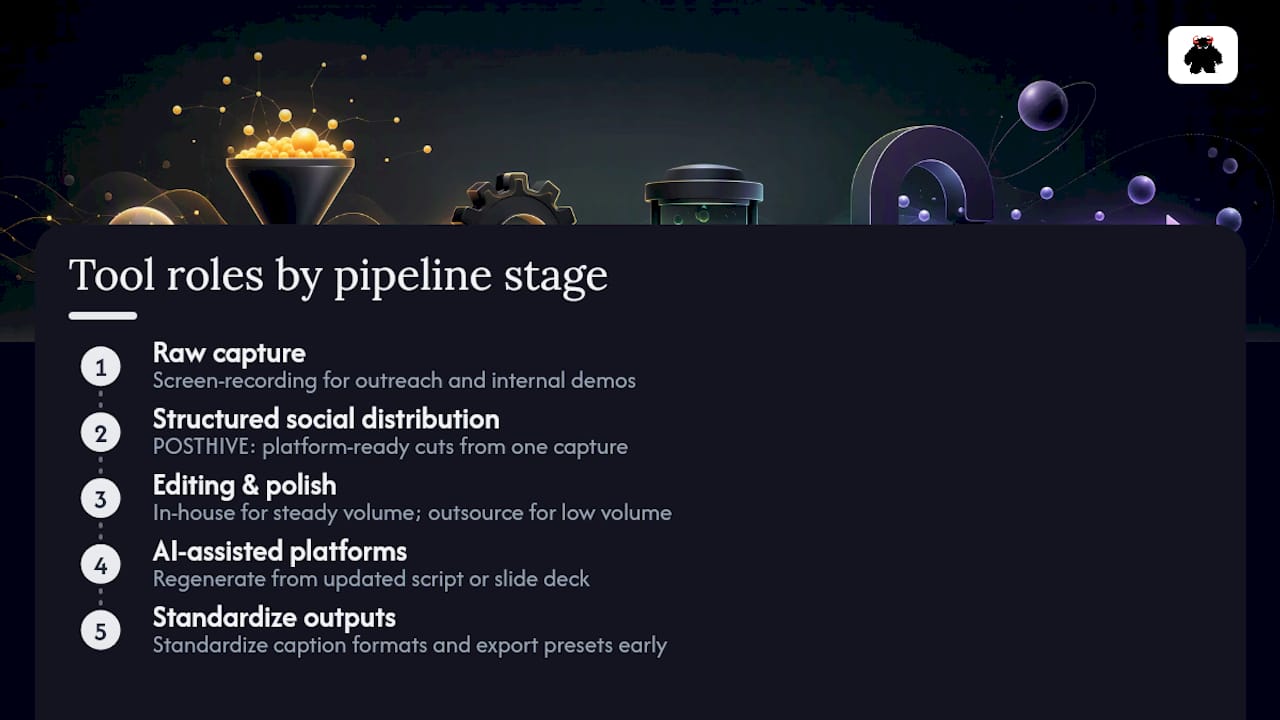
The right toolset depends on where the asset sits in your production pipeline, not on chasing the newest software. For raw capture, screen-recording tools handle personalized outreach and quick internal demos without needing a full studio setup. For structured social distribution, a tool like POSTHIVE helps turn a single raw capture into multiple platform-ready cuts without re-editing from scratch each time.
For editing and polish, the decision usually comes down to in-house software versus outsourcing to a production partner. Teams with a steady volume of assets benefit from standardizing on one editing platform and one brand kit, so every video looks like it came from the same company regardless of who cut it. Teams with lower volume are often better served handing that work to an external partner rather than maintaining software licenses and editing skill in-house.
AI-assisted platforms are changing the maintenance math. Pictory’s research shows teams can regenerate a video from an updated script or slide deck instead of re-shooting from scratch, which matters enormously for product videos tied to features that change quarterly. That’s less about replacing a human editor and more about keeping a large library current without ballooning production hours.
Whatever tools you choose, standardize on caption file formats and export presets across the stack early. Nothing wastes more time than reformatting the same video three different ways because each platform demands a different file spec.
Making B2B Product Videos Work for Every Viewer
Accessibility in B2B video isn’t a compliance checkbox, it’s a distribution multiplier. Burned-in captions, already necessary because of sound-off scrolling on LinkedIn, also serve deaf and hard-of-hearing viewers and anyone watching in an open office without headphones.
Color contrast on text overlays matters more than most creative teams assume. A pale gray CTA on a white background might look sleek in a mockup, but it disappears for viewers with low vision and performs worse in bright-screen conditions like a phone outdoors. Stick to high-contrast text and keep on-screen copy large enough to read on a phone screen without zooming.

Provide a full transcript alongside every hosted video, not just for search engines but for screen-reader users and for anyone who prefers reading over watching. Avoid relying on color alone to convey meaning in dashboard walkthroughs or annotated demos; pair color cues with labels or icons so colorblind viewers don’t lose the point of a chart or status indicator.
Diverse representation in customer testimonials and on-camera talent also broadens who sees themselves reflected in your product story, which matters directly for B2B buying committees that increasingly include a wider range of stakeholders than a single technical buyer. None of this slows production down meaningfully. It’s a checklist item, not a redesign.
Video as sales infrastructure, not a marketing side project
I’ve watched marketing teams treat video as a campaign line item, then wonder why the library goes stale within a quarter. Tag every asset by deal stage and persona, and wire it directly into your CRM so the right clip fires automatically at the right moment in a deal.
How Monstrous Media Group Turns Video Into Revenue Infrastructure
Most agencies hand you a finished video and call the project done. Monstrous Media Group builds the system around it, tagging assets by deal stage, wiring them into your CRM, and tracking which clips actually influence pipeline instead of guessing from view counts.

That’s the gap between a video and a video system. A single testimonial or demo only pays off when it’s discoverable by the right rep at the right moment in a deal, distributed through the channels your buyers actually use, and measured against pipeline instead of vanity views. Monstrous Media Group’s digital marketing services build exactly that infrastructure, connecting video production to marketing automation so triggered sends happen without manual work, and to email campaign management so personalized video outreach lands in the right sequence automatically. If your product videos are sitting in a folder instead of driving demo requests, request a video brief template and a short discovery call to map your library into a revenue system.
Frequently Asked Questions
What is the ideal length for a B2B product video?
It depends on funnel stage. Awareness clips run 15 to 30 seconds, consideration-stage explainers run 60 to 90 seconds, and decision-stage demos can run 3 to 5 minutes without losing the viewer.
Should B2B product videos go on LinkedIn or YouTube first?
LinkedIn first for most B2B teams. HubSpot's research shows about 80% of B2B teams now use LinkedIn for video sharing, ahead of YouTube. YouTube still matters for search discoverability and long-form content like webinars.
How much does professional B2B product video production cost?
Costs scale with ambition. DIY screen capture costs mostly staff time, semi-pro production with a freelance editor typically runs a few hundred to a couple thousand dollars per asset, and full professional production costs more depending on crew and location. Prioritize professional budget for decision-stage demos and testimonials first.
What KPIs should marketing teams track for product videos?
Watch-through rate, demo requests or MQLs influenced, and pipeline or deals touched by video are the three priority metrics. Raw view counts alone don't tell you whether a video moved a deal forward.
Why do captions matter so much for B2B video?
Roughly 79% of LinkedIn audiences scroll with sound off, according to Search Engine Land. Burned-in captions keep the message intact for silent viewing and also support accessibility for hard-of-hearing viewers.
Can one video shoot produce multiple assets?
Yes, and it should. A single customer interview or product capture can be cut into a full testimonial, several short social clips, and a sales follow-up video, which is far more efficient than shooting each asset separately.
What's the difference between a product demo and an explainer video?
A product demo walks through the actual interface or workflow for a buyer close to a decision. An explainer simplifies the problem and solution at a higher level for a consideration-stage audience not yet ready for a full walkthrough.
How should sales teams use video in outreach?
Short, personalized screen-recorded videos, similar to Loom's format, work well for outreach and follow-up. They should be tagged by deal stage and pulled from a searchable library rather than created from scratch for every prospect.
Do B2B product videos need a formal legal review?
At minimum, get signed appearance releases from anyone on camera, confirm copyright clearance on music or stock footage, and strip any sensitive customer data from screen recordings before they leave internal storage.
How does AI change B2B video production?
AI tools let teams regenerate video assets from updated scripts or slide decks instead of re-shooting, according to Pictory's research. That keeps a video library current as products change without the cost of repeated full production cycles.
## Sources- State of Video Marketing - HubSpot
- Why most B2B buying decisions happen on Day 1 - Search Engine Land
- Video Sales Enablement: B2B Guide 2026 - Sendspark
- 7 Examples of Engaging B2B Product Videos to Inspire Your Next Campaign - Wistia