
ADA website compliance means meeting WCAG 2.1 Level AA, the technical standard the Department of Justice built directly into its 2024 final rule for state and local government sites and apps. Deadlines are staggered by entity size, and the obligation doesn’t end at launch. Compliance is an operating discipline, not a one-time fix. Monstrous Media Group treats it this way for every client site it builds and manages.
TL;DR:
- Title II entities must meet WCAG 2.1 Level AA by their specific compliance deadlines based on current population size, with some dates extended; Title III assumes WCAG AA as the standard for private businesses.
- Accessibility covers all digital content, including PDFs, media, interactive tools, and mobile apps, with equivalent facilitation exceptions only if access remains equally effective.
- Ongoing compliance requires continuous monitoring, manual testing, and vendor management, as automated tools alone cannot ensure full usability for all disabilities.
- Fixing existing non-compliance starts with comprehensive audits, prioritizing template-level issues, and maintaining transparency through accessible statements and proactive content updates.
- Successful ADA compliance is a revenue and user experience investment, with building accessibility into site infrastructure and monitoring processes preventing legal risks and revenue leaks.
Table of Contents
- What Does ADA Website Compliance Actually Require?
- Who Must Comply, and by What Deadline?
- Your ADA Website Compliance Checklist: The POUR Framework
- How Should You Test and Maintain Ongoing Compliance?
- When Are Exceptions and Alternate Versions Allowed?
- What Triggers ADA Complaints, and How Do You Reduce Risk?
- How Monstrous Media Group Builds Accessibility Into Site Infrastructure
- What Legal Precedents Shape ADA Website Compliance Today?
- Where Can You Find Reliable ADA Compliance Support?
- Why Technical Compliance Alone Doesn’t Guarantee a Good Experience
- How Do You Fix a Website That’s Already Non-Compliant?
- Why Accessibility Protects More Than Just Your Legal Position
- Get an ADA Website Compliance Audit From a Team That Builds for It
- Sources
What Does ADA Website Compliance Actually Require?
The Department of Justice’s final rule took effect June 24, 2024, and it settled a debate that had dragged on for years: what technical standard does a website actually need to meet to satisfy the ADA? The answer is WCAG 2.1 Level AA, full stop, at least for the state and local government entities Title II covers. That’s the framework published by the World Wide Web Consortium, and it’s now baked into federal law rather than living as a best-practice suggestion.
“Web content” under the rule is broader than most site owners assume. It covers the obvious stuff (text, images, layout) but also PDFs and other documents posted online, video and audio media, interactive tools like appointment schedulers or payment portals, and the underlying code that determines whether a screen reader can parse a page at all. Mobile apps are explicitly in scope too. If your agency, city department, or public utility runs a native app for permit requests or transit schedules, that app has to meet the same bar as the website.
There’s one release valve built into the rule: “equivalent facilitation.” This lets a covered entity use a different technical approach than what WCAG specifically describes, as long as that alternative gives people with disabilities access that’s just as effective. It’s a narrow exception, not a loophole. If your workaround leaves a blind user with a worse experience than a sighted one, it doesn’t qualify, no matter how clever the engineering behind it.
Ada makes clear this isn’t a brand-new obligation dressed up in technical language. The ADA’s nondiscrimination and effective-communication requirements have applied to public-facing digital content for years. What changed in 2024 is specificity. Entities used to guess at what “accessible enough” meant. Now there’s a named standard, a named rule, and a named deadline attached to it.
For businesses that fall under Title III rather than Title II, the legal reasoning is different (more on that split below), but the practical target converges on the same place: WCAG 2.1 Level AA. Courts evaluating Title III web accessibility cases have repeatedly pointed to WCAG as the reasonable measuring stick, even without an explicit regulatory mandate for private businesses. Treating WCAG AA as your baseline, regardless of which title technically governs you, is the only defensible position going into 2026.
One more clarification worth internalizing: accessibility guidance documents from the DOJ are interpretive, not binding statute themselves, but they signal exactly where enforcement attention is headed. Ignoring that signal because it’s “just guidance” is a bad bet.
Who Must Comply, and by What Deadline?
Title II and Title III split ADA obligations along a simple line: who’s on the other side of the website. Title II covers state and local government entities, meaning city halls, public school districts, transit authorities, courts, and public universities. Title III covers public accommodations, which is the ADA’s term for privately operated businesses open to the public, including retailers, restaurants, healthcare providers, and financial services firms.
The 2024 DOJ rule directly targets Title II entities, and it sets compliance dates based on population size. Larger public entities face earlier deadlines than smaller local governments and special districts. The staggered structure was designed to give resource-strapped small municipalities more runway, but it also means two neighboring cities can be on completely different compliance clocks. Since the rule’s publication, some compliance dates have been extended, so you should confirm your entity’s current deadline directly rather than assume previous timelines.
Title III doesn’t have an equivalent regulatory rule specifying WCAG 2.1 AA the way Title II now does. That absence hasn’t stopped it from mattering. Private businesses get sued under Title III constantly for inaccessible websites, and courts lean on WCAG as the practical standard even without a formal rule forcing the issue. If you run a business covered by Title III, waiting for the DOJ to publish an equivalent private-sector rule before you act is not a risk-reduction strategy. It’s a bet against your own legal exposure.
Here’s how to figure out where you stand right now:
- Confirm whether your organization is a Title II government entity or a Title III public accommodation. This determines which legal framework applies to your exposure.
- If you’re Title II, check your entity’s population classification against the current DOJ compliance schedule, including any IFR extension that may have shifted your original date.
- If you’re Title III, assume WCAG 2.1 Level AA is your practical target now, since litigation precedent already treats it that way.
- Inventory every digital property your organization operates, including legacy microsites and third-party-hosted tools, since the rule’s “web content” definition sweeps in more than your main domain.
Your ADA Website Compliance Checklist: The POUR Framework
WCAG organizes every accessibility requirement into four principles known by the acronym POUR: Perceivable, Operable, Understandable, and Robust. It’s the fastest way to translate legal language into a task list your development team can actually execute against.
Perceivable means users can detect your content regardless of which sense they’re relying on.
- Write descriptive alt text for every meaningful image, skipping decorative ones with empty alt attributes so screen readers don’t announce clutter.
- Add captions to video and transcripts to audio content, since neither Deaf nor hard-of-hearing users can access an uncaptioned webinar no matter how good the content is.
- Maintain a color contrast ratio of at least 4.5:1 for normal text against its background, which is the WCAG AA threshold most design teams underestimate until a contrast checker flags it.
Operable means users can navigate and interact using a keyboard alone, not just a mouse or touchscreen.
- Build visible focus styles so keyboard users can see exactly where they are on the page at any moment.
- Test every interactive element, menus, modals, sliders, date pickers, to confirm it’s fully reachable and operable via keyboard.
- Add skip links so keyboard and screen reader users can bypass repetitive navigation and jump straight to main content.
Understandable means the structure and language of your site make sense to a human trying to complete a task.
- Use semantic, hierarchical headings (H1 through H4) instead of styled text that merely looks like a heading.
- Label every form field clearly and pair error messages with specific, actionable instructions rather than a generic “invalid input.”
Robust means your code holds up across assistive technologies and doesn’t break as browsers and screen readers update.
- Use ARIA attributes only where native HTML can’t do the job, since misapplied ARIA frequently makes a page less accessible, not more.
- Validate that accessible PDFs and downloadable documents carry proper tagging, reading order, and alt text, matching the same standard as your HTML pages.
Prioritize transactional pages first: login screens, payment flows, job applications, appointment scheduling. These are the pages where an access failure doesn’t just frustrate a user, it blocks them from completing a task entirely, and they’re disproportionately where complaints and lawsuits originate.
How Should You Test and Maintain Ongoing Compliance?
Automated scanners are useful for triage, not verdicts. Tools can flag missing alt attributes, insufficient contrast ratios, and malformed HTML in minutes across thousands of pages, but university accessibility teams consistently find that automation misses functional and semantic problems: a form that’s technically labeled but confusing when read aloud, a modal that traps keyboard focus, a custom widget that looks fine visually but announces nonsense to a screen reader. Accessibility overlays, the bolt-on widgets marketed as instant compliance, are not treated as a defensible complete solution by most practitioners in the field, since they patch symptoms without fixing underlying code.
A workable testing sequence looks like this:
- Run automated scans across the full site to catch the high-volume, low-nuance issues first.
- Test every transactional flow using keyboard-only navigation, tabbing through forms, menus, and checkout processes exactly as a mouse-free user would.
- Run the site through a screen reader (NVDA on Windows, VoiceOver on Mac) to catch what automation can’t see.
- Check rendering and behavior across major browsers and device types, since accessibility bugs often hide in device-specific quirks.
- Where resources allow, bring in actual users with disabilities for direct feedback, since lived experience surfaces friction no internal QA process will catch.
Vendor and third-party content sits inside your compliance boundary too. If a contracted chatbot, scheduling widget, or CMS plugin is inaccessible, that liability follows you, not just the vendor. Require a Voluntary Product Accessibility Template (VPAT) or equivalent accessibility statement before signing any contract, and write remediation service-level agreements directly into procurement language so a vendor’s future accessibility regression is your contractual problem to enforce, not just your legal problem to absorb.
Pro Tip: Build accessibility checks into your CI/CD pipeline and content publishing workflow, not just your pre-launch QA. A single unreviewed template change can silently strip alt text or break focus order across thousands of pages overnight, and automated regression testing is the only way to catch that before a user does.
Partner resources on the SEO overlap here are worth a look too. Accessibility work frequently improves organic visibility at the same time it reduces legal exposure, since semantic structure and clean markup are exactly what search engines and screen readers both rely on to parse a page correctly.
When Are Exceptions and Alternate Versions Allowed?
The DOJ rule carves out a narrow set of exceptions, and none of them function as a general escape hatch. Archived web content, material that predates your compliance deadline, was pulled from active use, and is kept only for reference or recordkeeping, generally qualifies. Content posted by a third party where the entity has no editorial control faces a different, more limited exception. Preexisting conventional electronic documents may also carry temporary flexibility.
Conforming alternate versions, a separate accessible version of a page or document, are permitted only in limited circumstances where achieving accessibility in the primary version isn’t feasible. This isn’t a preferred solution. Maintaining two parallel versions of the same content doubles your maintenance burden and creates a real risk of the alternate version quietly falling out of date while nobody notices.
The strongest practical move here is publishing a clear accessibility statement: what standard you follow, known limitations, and a direct contact method for someone who hits a barrier. Pair that statement with a fast internal process for responding to individual access requests, since a documented, responsive process is itself a meaningful mitigation if a complaint ever escalates.
What Triggers ADA Complaints, and How Do You Reduce Risk?
DOJ enforcement and private litigation under Title III have both climbed steadily, and the pattern in what gets flagged is consistent. Inaccessible transactional flows draw complaints fast, because they block someone from actually completing a purchase, application, or booking. Videos without captions, forms that reject input without explaining why, and third-party widgets embedded from a vendor who never tested for accessibility round out the most common triggers.
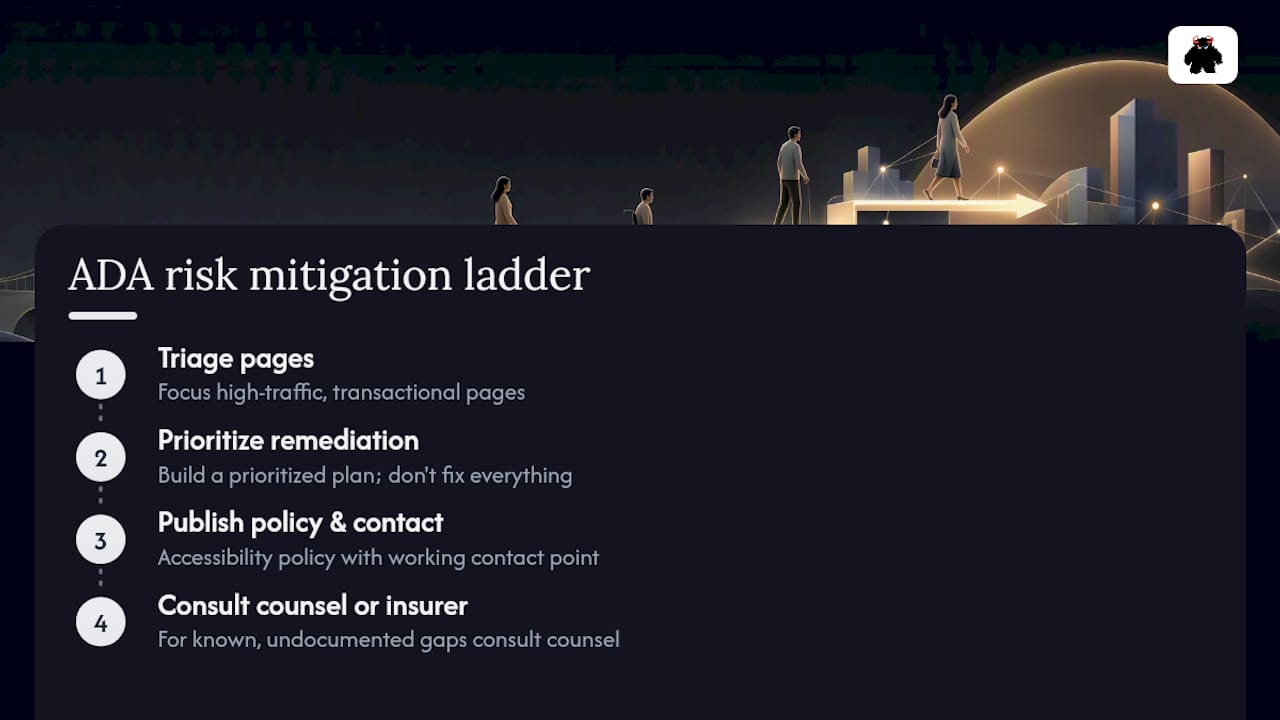
A pragmatic mitigation ladder looks like this: run immediate triage on your highest-traffic and most transactional pages first, build a prioritized remediation plan rather than trying to fix everything simultaneously, publish an accessibility policy with a working contact point, and consult legal counsel or your insurance carrier if you’re already carrying known, undocumented gaps. The entities that get into the deepest trouble aren’t usually the ones with imperfect sites. They’re the ones with no record of ever trying.
Public entities in particular should treat the DOJ’s rule as a floor, not a ceiling, since the Civil Rights Division’s stated enforcement priorities make clear that guidance documents, while not binding statute, reliably preview where scrutiny lands next.
How Monstrous Media Group Builds Accessibility Into Site Infrastructure
Monstrous Media Group doesn’t treat accessibility as a final QA checkbox bolted onto a finished site. It’s built into the web design and development process from the first wireframe, carried through code review, and monitored continuously through managed infrastructure rather than checked once a year and forgotten.
That means color contrast and semantic structure get addressed at the design stage, not patched after launch, informed by the same principles covered in our graphic design and brand checklist. It means AI-enabled development workflows catch regressions before they ship, not after a complaint arrives. Deliverables for clients typically include a full accessibility audit, a prioritized remediation plan, VPAT procurement support for vendor contracts, and ongoing monitoring that catches the silent template break before a user ever does. The operational outcome clients see: fewer access complaints, fewer abandoned transactional flows, and less revenue quietly leaking out through pages nobody realized were broken.
What Legal Precedents Shape ADA Website Compliance Today?
Website accessibility litigation under Title III has been building for over a decade, and the case law consistently points in one direction: courts treat a business’s website as covered by the ADA’s public accommodation requirements, even though the statute itself predates the commercial internet and never mentions websites explicitly. Retail, hospitality, and financial services companies have all faced suits over inaccessible checkout flows, unlabeled forms, and video content without captions.
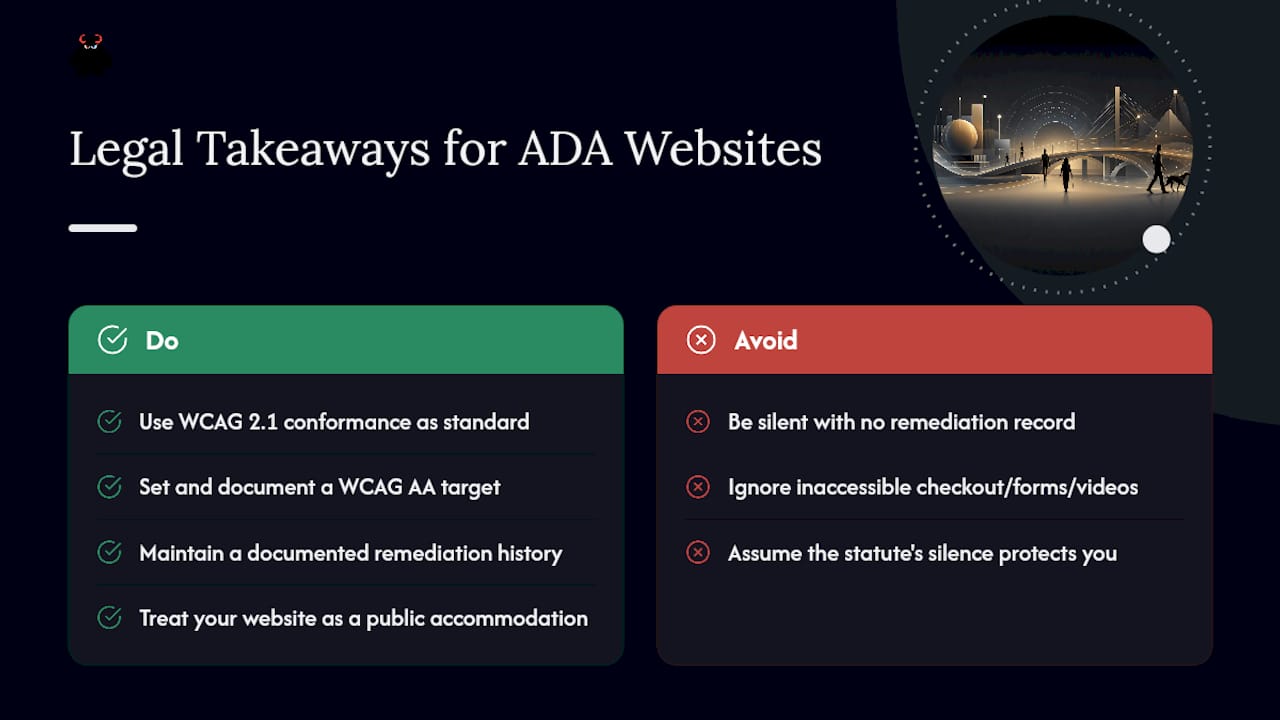
What matters practically for site owners isn’t memorizing case names. It’s recognizing the pattern: plaintiffs’ attorneys and advocacy groups both use WCAG 2.1 conformance as the yardstick when arguing a site failed to provide accessible access, and defendants who can point to a documented remediation history and a WCAG AA target fare considerably better than those with no record at all. The 2024 DOJ rule strengthens that pattern for Title II entities by giving it explicit regulatory force, and it’s reasonable to expect litigation involving private businesses to keep leaning on the same standard as the de facto benchmark, rule or no rule.
The lesson for any organization watching from the sidelines: a documented, in-progress remediation effort is a meaningfully different legal position than silence. Courts and regulators both respond to evidence of good-faith effort.
Where Can You Find Reliable ADA Compliance Support?
Several organizations offer authoritative, no-cost guidance worth bookmarking directly. ADA.gov publishes the DOJ’s own technical assistance documents, fact sheets, and small entity compliance guides, and it’s the first stop for interpreting what the rule actually requires in your situation. The U.S. Access Board maintains the technical standards and Section 508 cross-references that federal and public-sector teams rely on for implementation detail beyond what WCAG alone specifies.
The World Wide Web Consortium (W3C) maintains WCAG itself, including detailed success criteria explanations and techniques documents that translate abstract principles into concrete code patterns. State and local government associations frequently run their own accessibility working groups too, sharing remediation templates and vendor vetting checklists specific to public-sector procurement rules.
For staff training on an ongoing basis, building internal accessibility literacy across design, content, and development teams pays off faster than relying on a single external audit every few years. Monstrous Media Group’s education resources cover exactly this kind of team-level skill building, aimed at making accessibility a habit baked into daily workflow rather than a fire drill that recurs every time a complaint lands.
Why Technical Compliance Alone Doesn’t Guarantee a Good Experience
Passing an automated WCAG scan and building a website that’s genuinely usable by people with disabilities are related goals, but they’re not identical. A page can hit every measurable success criterion and still frustrate a screen reader user if the reading order is illogical, if a “skip to content” link exists but drops the user somewhere unhelpful, or if form validation technically has error text but that text doesn’t explain what to actually fix.
Real usability comes from testing with actual assistive technology and, ideally, actual users who rely on it daily. A sighted developer clicking through a keyboard-only test can confirm that focus moves logically. That same developer often can’t tell whether the experience feels efficient or exhausting for someone using it every day. Task completion time, cognitive load, and error recovery all matter as much as raw conformance scores, and none of them show up on an automated scan report.
Treating WCAG AA as the floor rather than the finish line is the mindset that separates organizations with genuinely accessible sites from organizations that merely have sites their lawyers can defend.
How Do You Fix a Website That’s Already Non-Compliant?
Start with a full audit rather than guessing at scope. Run automated scanning across every page and template, then layer manual keyboard and screen reader testing on top, prioritizing your highest-traffic and most transactional pages first. Building the fix list before touching any code prevents the common trap of patching visible issues while missing structural ones buried in a shared template.
Group findings by severity and by how many pages a single template fix will resolve. A broken form label pattern used sitewide is a bigger lever than a single missing alt tag on one blog post, even though both show up as findings. Fix template-level and component-level issues first, since those repairs cascade across every page using that pattern, and address one-off content issues in a second pass.
Once core remediation is complete, publish your accessibility statement, document the standard you’re targeting, and put monitoring in place so future content updates and design changes don’t quietly reintroduce the same problems you just fixed. Remediation without ongoing monitoring is a temporary state, not a permanent fix.
Why Accessibility Protects More Than Just Your Legal Position
I look at accessibility the same way I look at site speed or uptime: it’s revenue infrastructure, not a legal formality bolted onto the side of a marketing plan. Every visitor who can’t complete a checkout, submit a job application, or book an appointment because of a broken form or an unlabeled button is a conversion your business already paid to earn and then lost at the finish line. The SEO and user experience gains that come from clean semantic structure are a genuine bonus, but the core case for fixing this now is simpler than that. It’s about not leaking revenue you’ve already generated demand for. If you’re unsure where your site actually stands, that’s worth finding out before a complaint tells you.
- Vector
Get an ADA Website Compliance Audit From a Team That Builds for It
Monstrous Media Group is the operational alternative to hiring a compliance consultant for a one-time report and then being left to implement it yourself. We build accessibility into the site itself, then keep it there through managed infrastructure, instead of handing you a PDF audit and walking away.

Our process runs audit to remediation to ongoing monitoring, all under one team, so fixes don’t drift back into non-compliance six months after launch. That’s the gap most agencies leave open: they’ll flag your contrast ratio failures, but they won’t rebuild your templates, and they definitely won’t monitor your CI/CD pipeline for regressions after your next content update. We do both, through the same web design and development team that built your site in the first place, backed by SEO services that make sure the accessibility work also lifts your search visibility instead of sitting in a separate silo.
If you manage a public entity approaching a DOJ compliance date, or a business that simply wants a defensible position before a complaint arrives, request a compliance audit and remediation scope from Monstrous Media Group today.
Sources
- Federal Register: Nondiscrimination on the basis of disability; Accessibility of Web Information and Services of State and Local Government Entities
- Ada
- ADA Accessibility Standards | U.S. Access Board